This quarter, we are rolling out a set of powerful features designed to make time tracking, scheduling, payroll, and leave management even more flexible and accurate. From California-specific pay rules and improved facial recognition to new validations rules and more control over reports, these updates help organizations save time, reduce manual effort, and improve employee experience across every workflow. Let’s take a look at what’s new.
Drive Billing Accuracy with the New Billing Status Validation Rule
We have added a new validation rule to ensure timesheet billing status aligns with the associated project, task or user – reducing errors and improving accuracy. You can include error/warning messages, validate billing rates for billable entries and assign it to a timesheet template.
Please note that this feature:
- Applies to time & material projects
- Is supported on standard and agile timesheets
- Is supported on time distribution, in/out times + allocation widgets but not to time punches
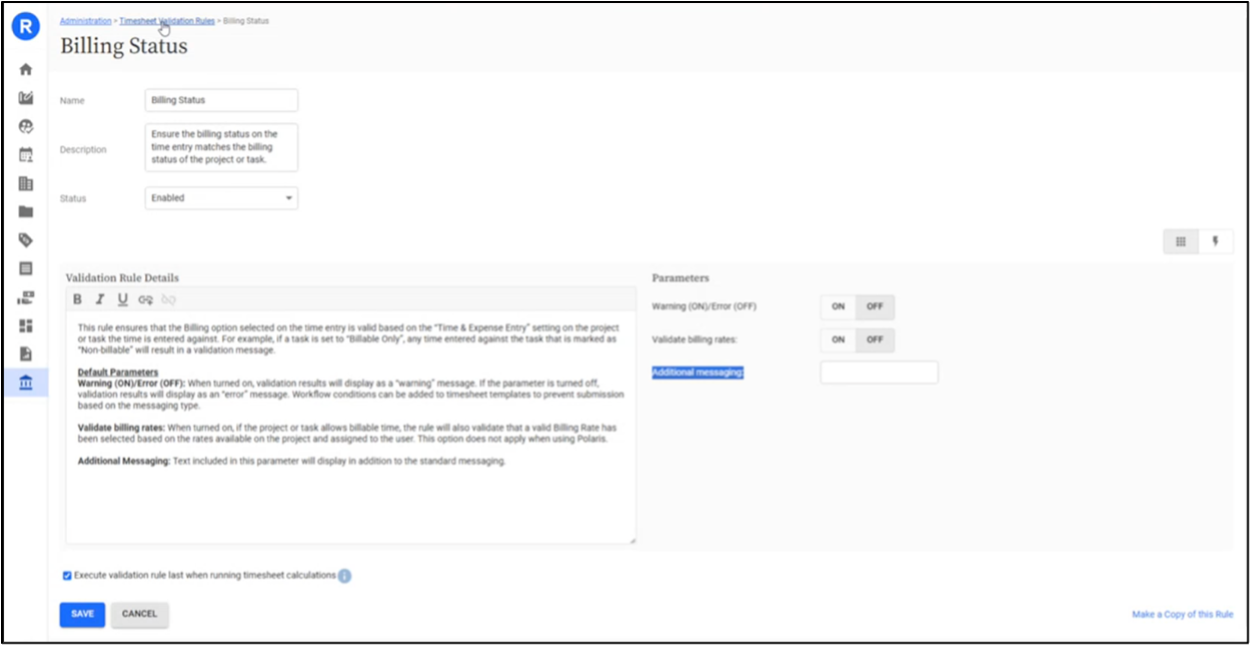
New Billing Status Validation Rule
Improve Accuracy with Enhanced CloudClock Facial Recognition
We have improved CloudClock’s facial recognition to deliver higher accuracy for employee punches. While setting up, employees must take five photos for improved facial recognition. Also, stored images are replaced with higher quality images during employee punches. This feature ensures better image quality and reliability while maintaining a seamless user experience.

Improved CloudClock Recognition
Share Cleaner Reports with the Option to Exclude Filters in PDFs
We have made it easier to share clean, ready-to-use reports with a new option to include or exclude filters when exporting, emailing, or scheduling report PDFs. This enhancement saves time and reduces manual edits – perfect for when you want to share a report’s insights without showing the underlying filters.
How it works:
- By default, filters are included in exported report PDFs.
- To remove them, simply uncheck the “Include Filters in the Report Header” option before exporting or scheduling the report.
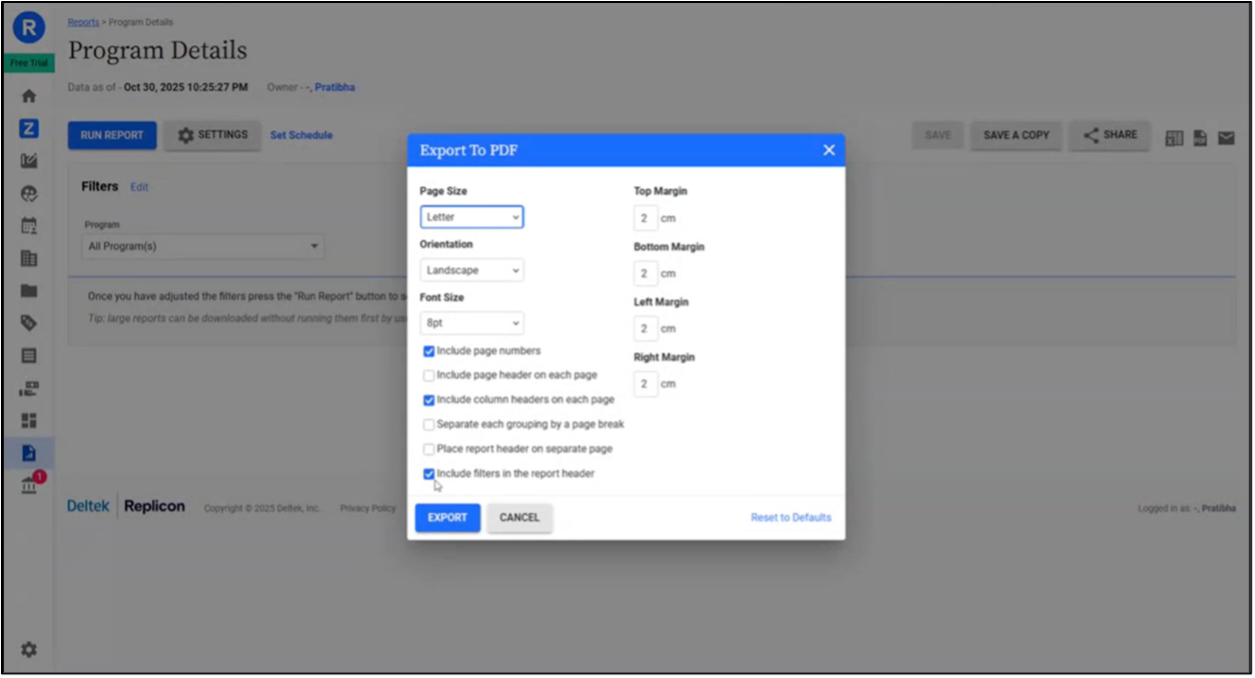
Exclude Filters in Report PDFs
Custom Time Off in Lieu Messaging on Timesheets
With our latest enhancement, you can customize titles and subtitles for the time off in lieu widget on the timesheets. This feature adds clarity and helps organizations align messaging with internal business policies. Please note:
- Custom titles and subtitles can be set via configuration
- Both title and subtitle work independently. The subtitle field supports a maximum limit of 255 characters
- In case a custom title or subtitle is not entered, the default text value is chosen
- Fully supported on both Android and iOS apps
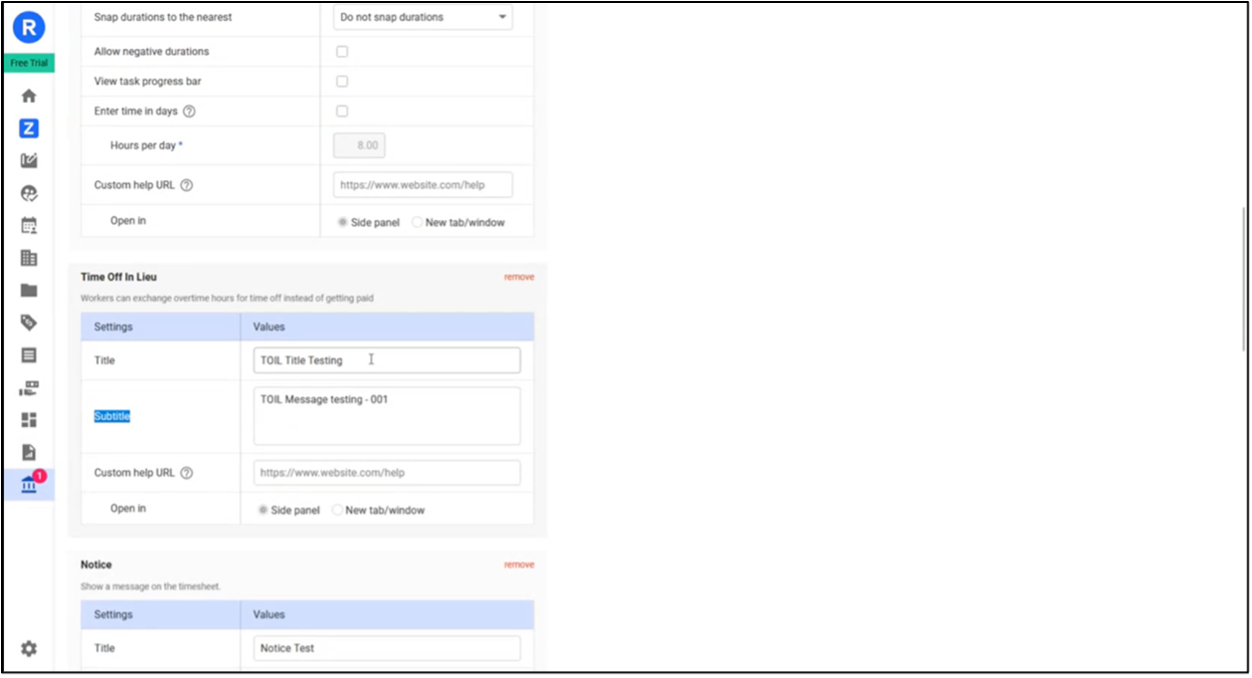
Custom Time Off in Lieu Messaging on Timesheets
Book Time Off on Non-working Days
We now offer the flexibility to book time off on both working and non-working days, driving accurate time off hour calculations for employees based in France (for part-time employees), Spain (annual leave requirements), and Brazil, where statutory rules require counting calendar days rather than just working days. Using this feature, you can easily:
- Configure which leave types support booking on non-working days.
- Select non-working days and/or holidays based on your business policies.
- Choose between the previous working day’s schedule or a fixed default value.
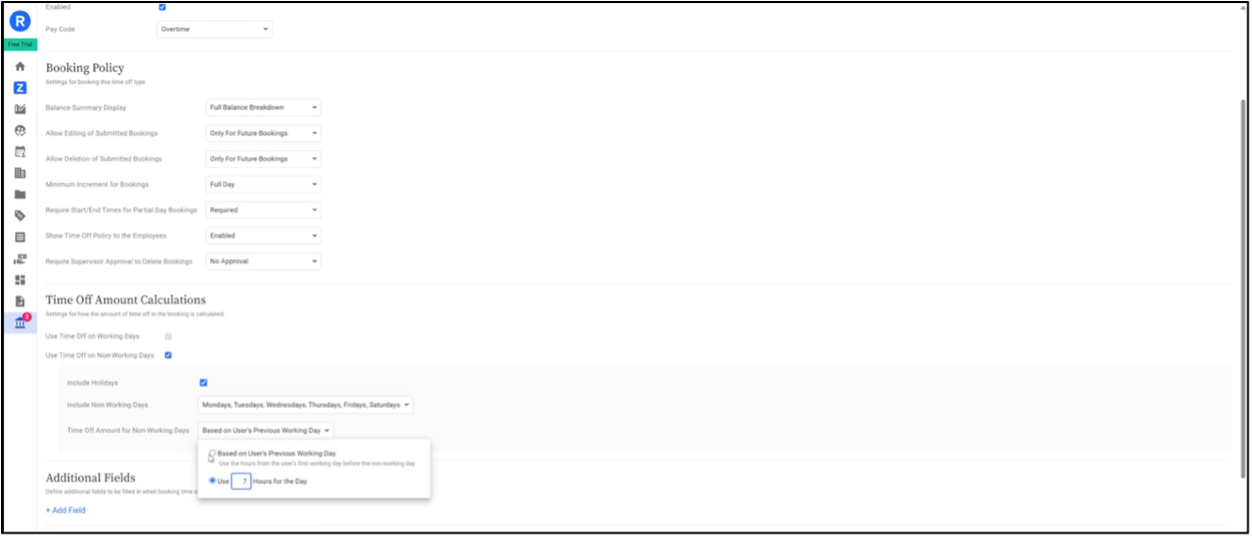
Book Time Off on Non-working Days
Please note that the existing users who book time off on working days will not be impacted with this new feature release. Booking time off on non-working days can be simply enabled by the system administrator with zero disruption.
Manage Labor Compliance with the New California 9/80 Alternative Schedule Pay Rule
We have added a new California 9/80 Alternative Schedule Pay Rule to help organizations navigate labor compliance with state-specific rules while supporting flexible work arrangements.
The 9/80 schedule where employees work 9 days totaling 80 hours over two workweeks is a popular work schedule in California that gives employees every other Friday off. Our new pay rule supports enhancements like 7th day premiums, daily & weekly overtime, and meal & rest break penalties.
To use this pay rule effectively, please note:
- Employees must be on a biweekly schedule
- The pay rule’s effective date must align with the biweekly schedule’s start date
- Hours on the working Friday are split at 12 PM — the first four hours count toward Workweek 1, and the next four toward Workweek 2
- The employee’s workweek should run from Friday to Thursday (or start from another day if the split day differs)
- You can adjust the employee’s day start time as needed
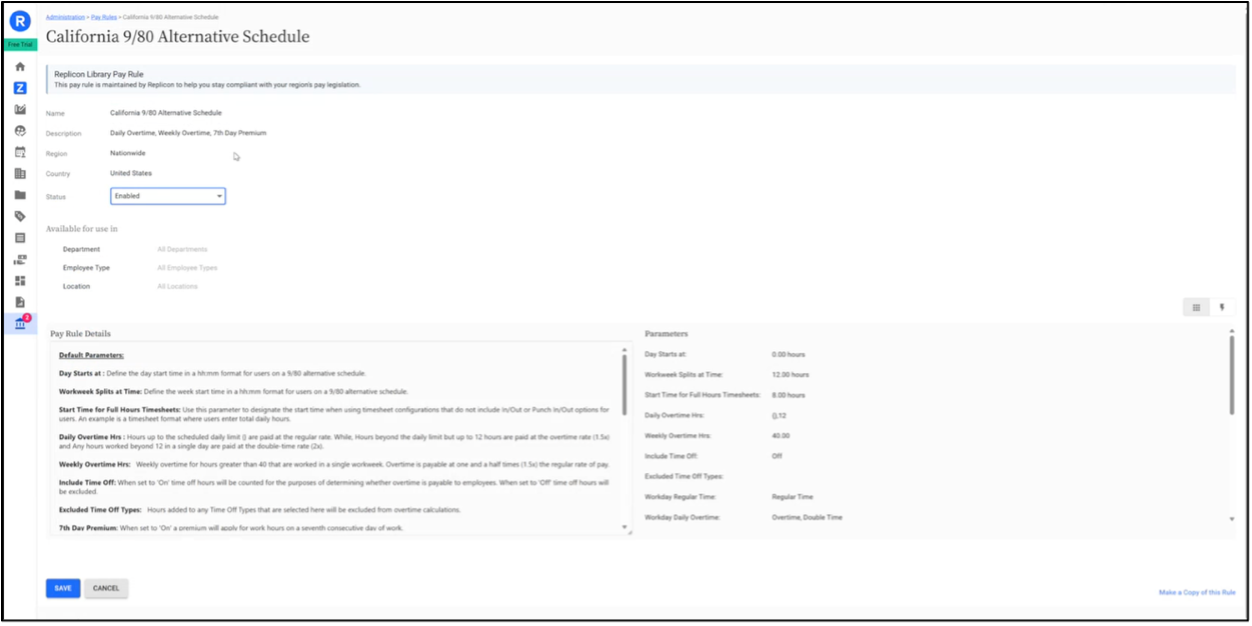
California 9/80 Alternative Schedule Pay Rule
Updates to Time Off Booking Validation Rules
We have enhanced our time off booking validation rules to give system administrators greater flexibility and control, without requiring complex development changes.
What’s new:
You can now customize error messages for the following validation rules to make them clearer and more relevant to your organization’s policies.
- Limiting time off within a rolling period
- Restricting bookings at the start or end of the day
- Preventing zero-hour bookings
- Flagging overlapping bookings
This means your teams will see easy-to-understand error messages when a booking doesn’t meet policy requirements – reducing confusion and admin effort.
Plus, a brand-new validation rule:
We have introduced a new validation rule where time off booked must be a multiple of a specific value (for e.g., 0.25 hours). For example, if time off booked must be a multiple of 0.25 hours i.e., 15 minutes, whenever someone’s booking a time off, this validation rule will ensure that the booking is of minimum 15 minutes or multiples of 15 minutes.
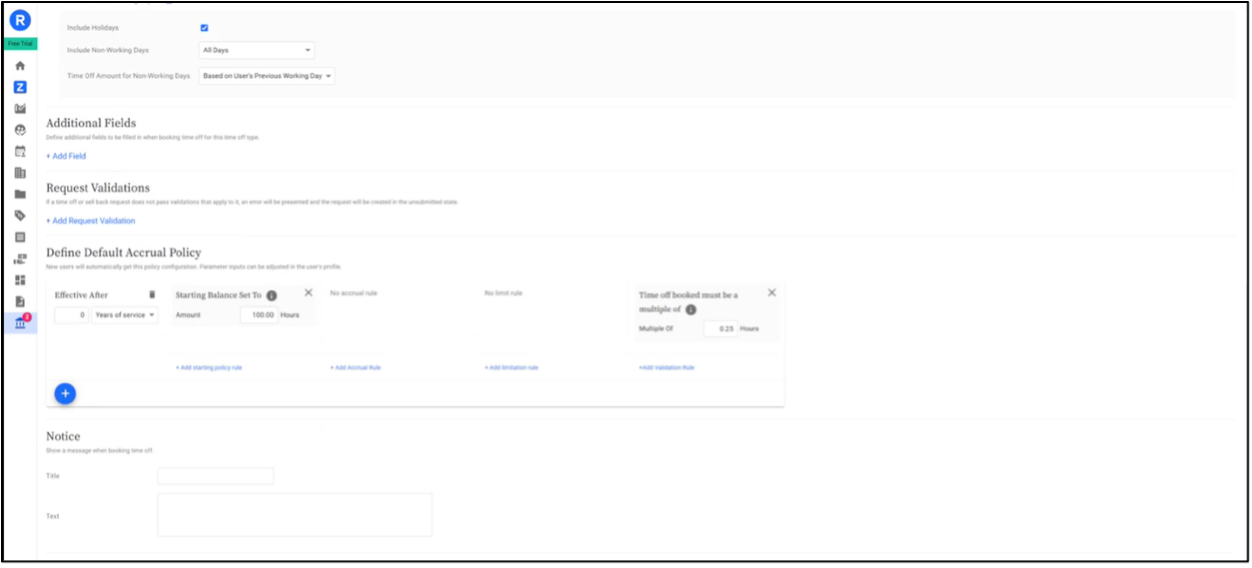
Updated Time Off Booking Validation Rules
Choose Specific Employees to be Synced from Vantagepoint to Replicon Time
Managing employee data across Vantagepoint and Replicon Time just got simpler. You can now choose exactly which employees to sync from Vantagepoint to Replicon Time. With powerful filters like home company, organization, pay type, state, country, labor code, and category, you can tailor your syncs to match your business needs. Whether you’re managing multiple entities, locations, or workforce types, this update gives you greater control, improved data accuracy, and faster setup.
Stay Up to Date with Deltek Replicon
These updates reflect our ongoing commitment to simplifying labor compliance, improving accuracy, and empowering both system administrators and employees with flexible, intuitive solutions. Whether it’s new pay rules, better validation, or flexible reporting, every enhancement is designed to help your organization manage time with precision and confidence.