This article covers the latest Maconomy Essentials release: a new Financial Analysis submenu in the Web Client, stronger project access control, and more flexible People Planner layouts, alongside continued progress on the Web Client migration.
Why It Matters: Finance teams get Workspace Client functionality without leaving the browser, and People Planner administrators get tighter control and more flexible personal views.
Key Takeaways:
- The new Financial Analysis submenu brings five Workspace Client workspaces, Account Ledger, Local Account Ledger, Dimension Report, Entries, and Journal Entries, into the Web Client.
- A new global setting validates a user's project access against their Maconomy permissions, closing a gap that let users view projects outside their normal access (it disables Multi-Project view when turned on).
- People Planner users can now save, name, and switch between multiple versions of a personal layout, each with its own columns, sorting, and filters.
What if your finance team could dig into the general ledger without leaving the Web Client, your People Planner administrators could lock down project access with a single new setting, and your planners could finally save more than one version of a layout? Maconomy Essentials 2026.4 delivers all three, along with a handful of smaller improvements that add up to a genuinely useful quarter.
This release also marks a milestone in the platform's ongoing migration journey. Here is what's inside, and what it means depending on where your organization stands.
Where We Are in the Migration Journey
Essentials Customers
The container and tech stack migrations that have anchored the Essentials roadmap for the past several releases are now complete across every customer wave. With that foundational work behind you, the Web Client migration is the active phase for Essentials customers. The Workspace Client remains available as a backup while your teams complete that transition, and its retirement is tied to the 2027.2 and BI 2025 migration. If your organization has not yet started planning its move to the Web Client, now is the time.
Flex Customers
Flex customers are moving through the same phases on a parallel timeline. Container and tech stack migrations for Flex are complete through this release as well, and Flex organizations are now entering the same Web Client migration phase, with the Workspace Client available as a backup until that same 2027.2 and BI 2025 milestone.
Maconomy Enhancements
Financial Analysis in the Web Client
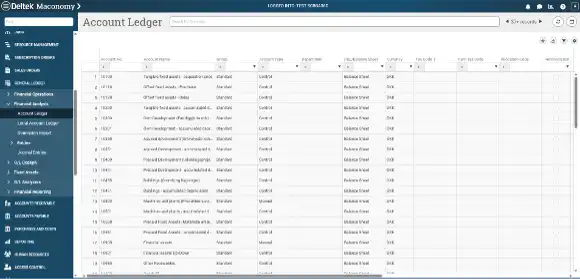
The General Ledger module gains a new Financial Analysis submenu in the Web Client, bringing five workspaces that previously lived only in the Workspace Client into the modern experience: Account Ledger, Local Account Ledger, Dimension Report, Entries, and Journal Entries. Finance teams can now review account-level detail, dimension-based reporting, and journal entries without leaving the browser.
People Planner Enhancements
In this quarter's release of People Planner, improvements have focused on the user experience and ease of use, with enhancements made to access control, reporting, and everyday usability.
Stronger Access Control for Project Data
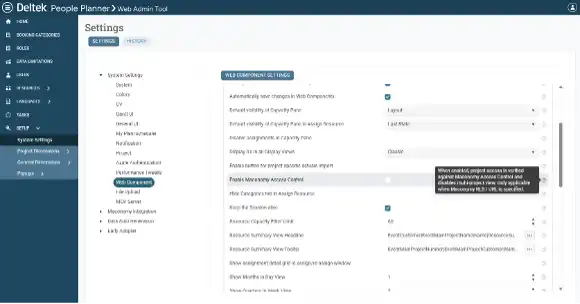
A new global setting lets administrators validate that the project a user is viewing is one they actually have access to under their Maconomy access rights. Enabling it closes a gap that previously let a user modify a URL to view a project outside their normal permissions. It is worth noting that turning the setting on disables Multi-Project view, so it is a trade-off worth discussing with your team. The setting ships disabled by default, so current system behavior will not change until you decide to turn it on.
More Calculated Columns for Resource Planning
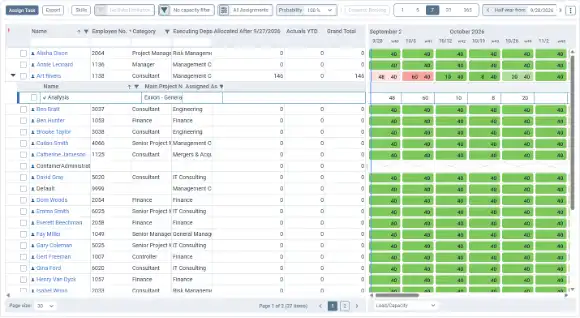
Three calculated columns that have long been available in the People Planner Rich Client are now available in the Web Client too. Actuals to YTD (Yesterday), Allocated After Yesterday, and Grand Total can now be added to the Resource Management workspace and the Resource Gantt Chart, giving planners more of the numbers they need without switching views.
Save Multiple Versions of Your Personal Layouts
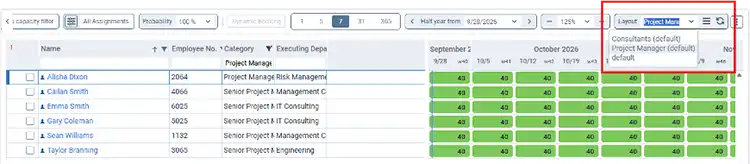
Personal layouts in People Planner were previously limited to a single saved version, which made it hard to keep separate configurations for different tasks. Users can now create, name, rename, and delete additional versions of their personal layouts, each with its own columns, sorting, and filters, and switch between them whenever the task calls for it.
Resources to Support Your Migration
The Deltek Learning Hub has everything you need to plan and execute your Web Client migration:
- Administrative guides for configuring and managing the Web Client
- Release notes for 2026.4 and all previous Essentials releases
- Recordings of quarterly release webinars and customer events
- Dedicated Web Client training materials for end-user adoption
Deltek Support and your Customer Success Manager remain your best points of contact for migration planning and testing support.
Looking Ahead
Essentials 2026.4 closes out a major chapter for the platform. With container and tech stack migrations now complete across every customer wave, attention turns fully to Web Client adoption, alongside the steady cadence of quarterly improvements that continues to bring meaningful new functionality to Maconomy and People Planner.
Customer Town Hall
See What's Next for Deltek Maconomy
Join Deltek experts and fellow customers each quarter to discuss product vision, recent releases, and how our Maconomy fits your goals.