This article covers the latest Maconomy release for Enterprise customers: broader Ask Dela insights, a new Project Financials Overview workspace, and a long list of Web Client usability upgrades.
Why It Matters: Enterprise project teams get sharper financial visibility and a faster, more intuitive Web Client, without adding complexity for administrators.
Key Takeaways:
- Ask Dela answers more, and answers better: expanded data coverage plus an upgraded model make everyday questions genuinely useful.
- The new Project Financials Overview workspace gives project managers one place to compare actual results to budget, by task, employee, or category.
- A broad set of Web Client upgrades, from traffic light styling to the new Table Details component, make day-to-day navigation noticeably faster.
What would it take to give your project managers one place to see the full financial story of a job, hand your finance team a faster way to manage asset values, and make your AI assistant genuinely useful for everyday questions? For enterprise professional services firms running Maconomy, that is exactly what the latest Maconomy release delivers.
This release expands Ask Dela with new data sources and a stronger model, gives project managers a dedicated workspace for comparing actual results to budget, streamlines a handful of everyday business processes, and rolls out a long list of Web Client improvements. It also marks an important milestone: this is a Web Client only release, so if your organization has been holding onto the Workspace Client, now is the time to plan your move.
A Smarter, More Streamlined Web Experience
The latest Maconomy release advances the web experience with practical improvements that make everyday work easier for project managers, finance teams, and employees alike. This release expands what Ask Dela can see and answer, strengthens project and financial visibility, streamlines a handful of everyday business processes, and delivers a broad set of Web Client usability enhancements.
Here is what's inside, and why it matters.
Broader, More Useful Insights from Ask Dela
Ask Dela, Maconomy's AI assistant, gets meaningfully smarter in this release. It now draws on expense sheets, mileage entries, draft invoices, and People Planner data, so questions that used to mean digging through several workspaces can be answered directly in chat, subject to your own access and configuration.
The answers themselves are better too. An upgraded underlying model paired with refined prompts means more accurate, more relevant, and easier to scan responses, whether you are asking about job status, KPI terminology, or a specific employee's expense sheet.
- More flexible help content: Cloud customers can now add PDF and Word documents to Help Documents, so Ask Dela can search your existing documentation without you needing to reformat it first, and it will cite the source document in its answer.
- Configurable Top and Bottom lists: Smart Summaries can show a limit you choose, up to 25 records, sorted by up to three fields, instead of just whatever changed most recently.
- AI-generated thread titles: Ask Dela now generates descriptive titles for chat threads automatically, so past conversations are easier to find and pick back up.
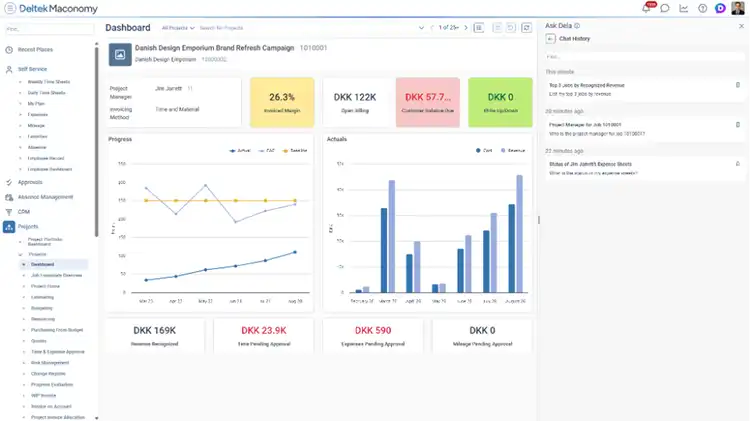
Clearer Project and Financial Oversight
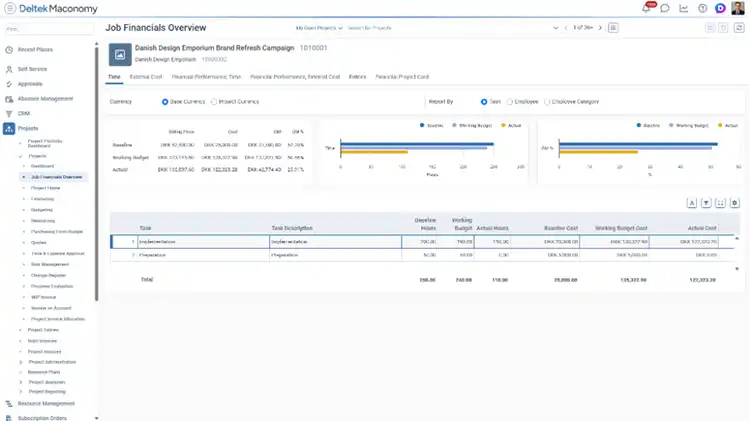
For project managers, one of the most requested capabilities finally has a home. The new Project Financials Overview workspace gives you a single place to compare actual time, cost, and financial performance against both baseline and working budgets. Break the numbers down by task, employee, or employee category, and view them in base or job currency, all without leaving the workspace.
Finance teams get their own upgrade with prospective depreciation, a new method for calculating straight-line or book depreciation based on an asset's remaining useful life. It gives you more flexibility in how you manage asset values going forward.
More Efficient Business Processes
A handful of process improvements remove friction from everyday administrative work.
Pass-through job creation is now a one-step process. When a job comes from a template and its job group is configured to allow it, you can create the main job and its pass-through subjob at the same time, instead of circling back afterward to set it up separately.
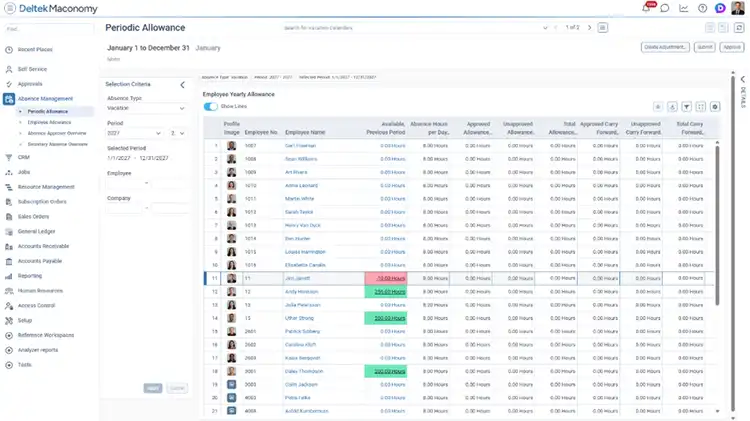
Absence management gets a fix that has been a popular request in the Ideas Portal. Negative absence balances can now carry forward into the next vacation period as a negative Carry Forward entry, where they are offset against the new allowance. So if an employee uses 16 hours of absence before that allowance is granted and ends the period at negative 16 hours, that balance follows them into the next period instead of simply disappearing.
Outgoing e-invoicing becomes more flexible as well, with additional formats and a test mode that make it easier to validate configuration before you go live.
A More Productive Web Client
The bulk of this release's enhancements live in the Web Client, and taken together they add up to a noticeably smoother day-to-day experience.
Traffic light styling now supports semantic background colors, Danger, Warning, Success, Info, Highlight, and Neutral, that map automatically to your light or dark theme and can be customized per organization. It replaces the older foreground-coloring approach across cards, tables, and filters, and makes status information easier to spot at a glance.
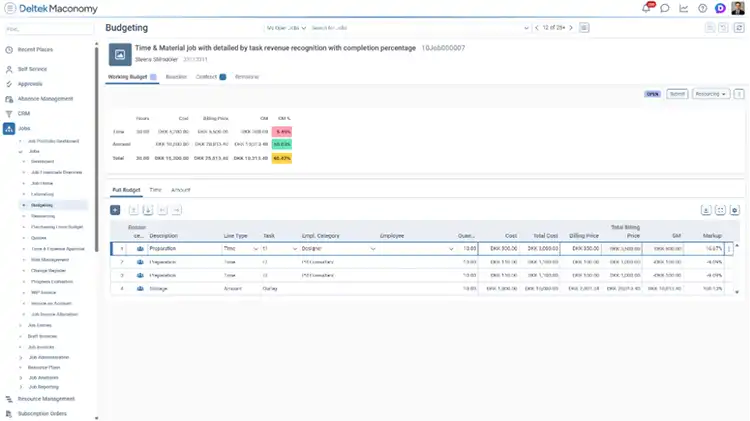
Budget tables get a readability boost too. Summary lines in work-breakdown-structure budgets now display in bold with a highlighted background, so aggregated values are easier to find in large, complex budgets. In timesheet workspaces, non-working days are shaded automatically based on each employee's configured calendar, while time entry on those days is still fully supported.
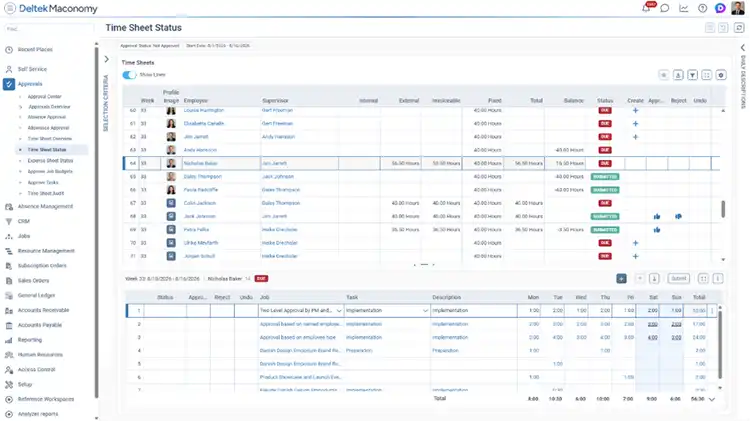
Navigation gets a meaningful upgrade with the new Table Details component. Select a row in a parent table and its related entries appear right below it in a resizable pane, complete with a draggable splitter that Maconomy remembers between sessions. It is live today in Time Sheet Overview, Time Sheet Status, the Approval Center, and the WIP Invoice workspace.
Rounding out the Web Client updates:
- PDF report output: Web Analyzer reports can now be printed or downloaded as PDF, with control over format, paper size, orientation, column layout, and header or footer text.
- Column chooser enhancements: The column chooser supports multi-select, so you can add, remove, or reorder several columns at once, and the dialog is bigger by default with a new Maximize option.
- Broader interval search: The Between operator now works on real, integer, amount, and string fields, not just dates, so you can filter by a minimum and maximum value across far more of your data.
- Pipe-delimited filter search: Filter search fields accept pipe-delimited values, so you can paste a list of records, say one generated by Excel's TEXTJOIN function, and search for all of them in a single pass.
- Stronger access control: A new Can Change Employee Profile Image permission lets administrators control who can update employee profile pictures, without affecting who can view them. It is turned on automatically for existing users, so nobody's workflow breaks at upgrade.
Why Make the Move?
- More accessible insights, thanks to broader Ask Dela coverage and sharper response quality.
- Better project control, with one workspace to compare actual results against baseline and working budgets.
- A more efficient Web Client, with clearer visual cues, stronger navigation, easier reporting, and faster filtering.
- Streamlined administration across job setup, absence management, fixed assets, and user access.
Resources and Next Steps
- Visit the Maconomy Help Center for training materials, FAQs, and the latest release notes.
- To discuss upgrade readiness or scheduling, submit a Service Request or contact your Customer Success Manager or Account Manager.
Customer Town Hall
See What's Next for Deltek Maconomy
Join Deltek experts and fellow customers each quarter to discuss product vision, recent releases, and how our Maconomy fits your goals.