Accurate time data should be easy to capture, simple to manage, and useful before issues arise. Replicon Time’s Q3 2026 release brings new capabilities designed to reduce manual effort for employees, give administrators greater control over workforce data and processes, and help organizations stay ahead of compliance, overtime, and project cost challenges. From intelligent time capture and more flexible tracking controls to proactive validations, pre-approvals, and expanded cost visibility, these enhancements help teams work more efficiently while improving accuracy and oversight.
Let AI Write Timesheet Comments So Employees Can Focus on Billable Work
Creating meaningful timesheet comments is often one of the most time-consuming parts of automated time tracking, especially for employees logging multiple activities throughout the day. To simplify this process, ZeroTime now automatically generates professional timesheet comments using activity data captured from supported sources such as calendars, files, emails, browsers, and other work systems. Users can accept or reject suggested comments, and the system continuously learns from those interactions to improve future recommendations. Organizations can choose whether timesheet comments are generated automatically or on demand.
The result is faster timesheet completion, more consistent project documentation, and better visibility into the work performed. Whether supporting high-volume billers, new employees learning documentation best practices, or professionals whose work spans multiple applications, the capability helps transform fragmented activity into clear, client-ready project records.
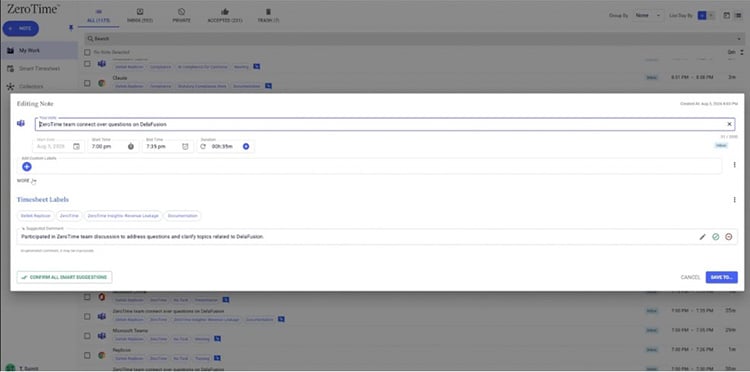
AI-generated timesheet comments
Gain Greater Control Over Work Activity Tracking with Collector Blocklists
Organizations often need flexible work activity tracking controls that balance visibility with compliance and privacy requirements. ZeroTime now introduces blocklists for desktop and browser collectors, allowing administrators to exclude specific applications and websites from tracking while continuing to capture activity across the rest of the work environment. Unlike allow lists, which require administrators to define everything that should be tracked, blocklists make it easier to manage large and dynamic application ecosystems. This enhancement gives organizations greater control over the information captured by ZeroTime while reducing administrative effort. Administrators can confidently exclude personal, confidential, or unsupported applications, helping ensure tracking policies align with organizational requirements without limiting visibility into productive work.
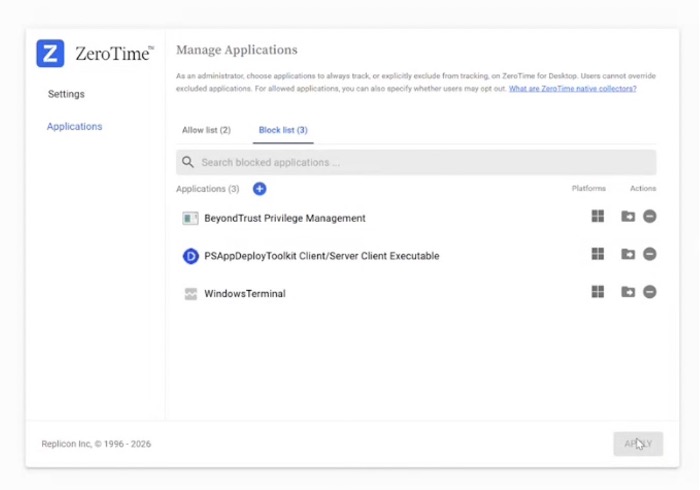
More Flexibility with Collector Blocklists
Simplify Manual Time Tracking with Inline Timers
Not every activity can be captured automatically. Employees frequently spend time in phone calls, in-person meetings, or unsupported applications that still need to be recorded accurately. Our new inline timer experience allows users to start and stop timers directly from work items, eliminating the need to keep separate tracking windows open while they work. A visual indicator clearly shows the active timer, and time continues to run in the background even when users switch tabs or close parts of the application.
This capability makes manual timekeeping simpler and more accurate by allowing employees to capture work as it happens. By reducing friction, organizations can improve timesheet accuracy and ensure important work activities are recorded, regardless of where that work takes place.
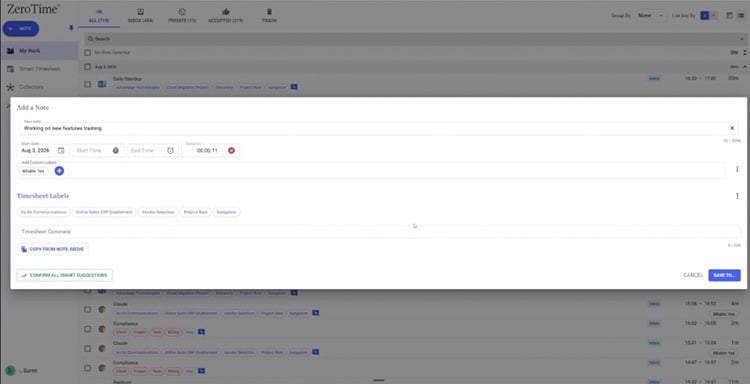
Simpler Time Tracking with Inline Timer
Recover Missed Work with Multi-Day Browser Activity Retention
Employees do not always submit time at the end of every day. Previously, this could result in lost information and added effort to reconstruct work after that. To address this challenge, the browser collector can now retain up to seven days of unsubmitted activity for users operating in manual submission mode, giving them greater flexibility when reviewing and submitting their work. By preserving activity data beyond a single day, organizations can reduce missing time entries, improve timesheet accuracy, and minimize the frustration associated with recreating work from memory. The enhancement helps support real-world work habits while ensuring valuable work data remains available when employees are ready to submit it.
Distribute Payroll Hours Without Allocating Time Off
Organizations that allocate payroll costs across projects often do not want time-off hours distributed alongside worked hours. Previously, this required workarounds that added complexity to payroll processing. The new Payroll Without Time Off distribution script allows organizations to distribute regular and overtime hours while excluding time-off hours from project allocations. This ensures payroll costs better reflect actual project work and eliminates the need to assign leave time to placeholder projects or categories. By separating productive work from non-working time, organizations can improve project costing accuracy, simplify payroll administration, and reduce the manual effort required to prepare cleaner project and financial reporting.
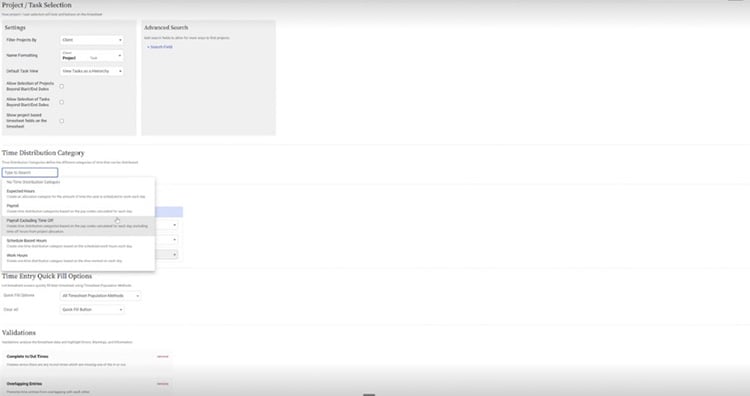
Distribute Payroll Hours Without Allocating Time Off
Gain More Flexibility When Allocating Timesheet Hours
Payroll and workforce management processes often require certain pay codes, such as time off, meal penalties, or other non-billable categories, to be treated differently during allocations. The enhanced Allocate Timesheet Hours script now allows administrators to exclude specific pay codes from time distribution calculations, including support for multiple pay codes within a single configuration. This added flexibility helps organizations align workforce management processes with their operational requirements while reducing manual adjustments and improving the accuracy of downstream payroll and project reporting.
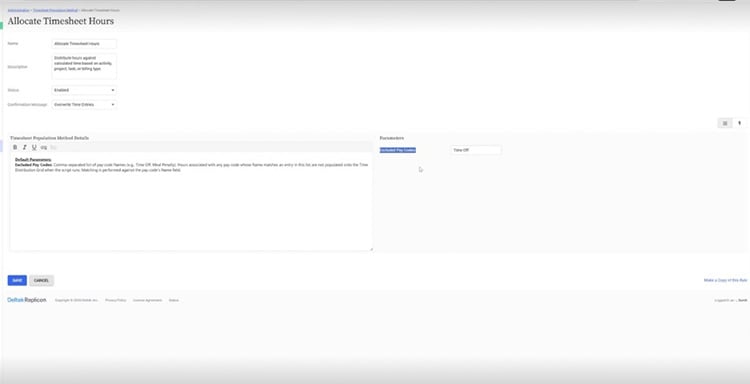
Gain More Flexibility When Allocating Timesheet Hours
Stay Ahead of Regulatory Changes and Overtime Risks
Managing compliance across changing labor regulations can create significant administrative overhead for organizations, particularly those operating in multiple regions. To help businesses remain compliant and reduce risk, this release includes updated payroll support for regulatory changes in Colombia, including a reduction in the weekly overtime threshold from 44 to 42 hours and an increase on Sunday and public holiday premium pay from 80% to 90%. These updates are automatically applied to help customers stay aligned with evolving labor requirements. In addition, Replicon now offers proactive overtime validation messages that alert users when current working patterns are trending toward overtime limits before thresholds are exceeded. Administrators can configure when these warnings appear, enabling organizations to take preventive action rather than reacting after a violation occurs.
Together, these enhancements help organizations reduce compliance risk, improve workforce planning, and stay ahead of regulatory changes. Managers gain greater visibility into potential overtime issues before they impact operations, while payroll teams can be confident that evolving statutory requirements are reflected in the system, reducing manual intervention and helping ensure ongoing compliance.
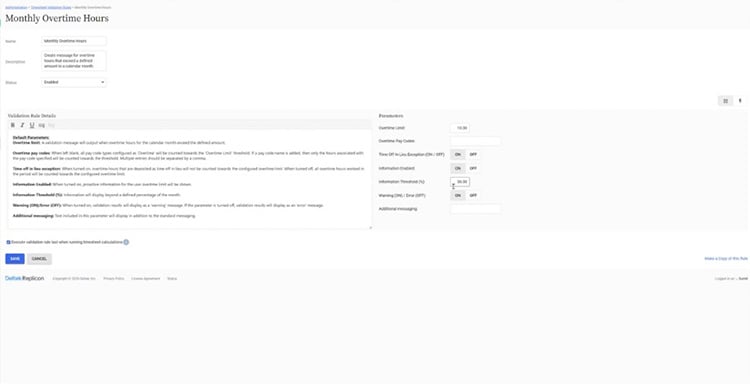
Stay Ahead of Overtime Risks
Plan and Control Overtime with Pre-Approval Requests
Managing overtime often requires balancing workforce availability, project demands, and labor costs. To help organizations gain greater control over specialized work before it happens, Replicon now supports overtime pre-approval requests. Employees can request authorization for overtime, standby shifts, or other types of extra work before the work is performed. Organizations can configure request templates, approval workflows, validation rules, notifications, reporting, and custom fields to match their specific business processes. The feature supports both web and mobile experiences and can be configured so requests flow between employees, supervisors, and project managers based on organizational requirements.
By moving approvals earlier in the process, organizations can better control overtime costs, improve workforce planning, and create clearer accountability around additional work. Validation rules can also prevent timesheet submission without prior approval, helping businesses enforce internal policies while maintaining a smooth employee experience.
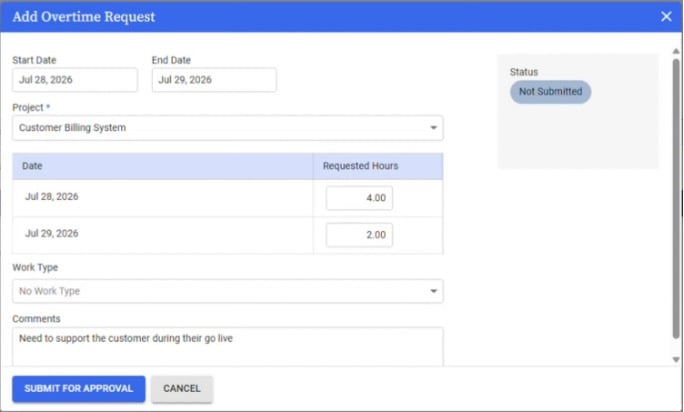
Plan and Control Overtime with Pre-Approval Requests
Capture AI and Equipment Costs Alongside Labor
Labor costs are only one part of the project profitability equation. As organizations increasingly rely on AI tools, specialized equipment, and other operational resources, understanding the full cost of project delivery becomes more important. Replicon now introduces AI and equipment usage tracking, enabling organizations to capture usage data for AI agents, construction equipment, tools, and other resources directly within timesheets. Administrators can define equipment categories, usage fields, and cost rates, while employees can easily record usage data that is incorporated into project reporting.
This capability helps organizations gain visibility into project costs beyond labor alone. Whether tracking AI adoption, machine utilization, maintenance schedules, or equipment-driven expenses, businesses can make more informed decisions about resource allocation, profitability, and operational efficiency while expanding project costing capabilities beyond traditional time tracking.
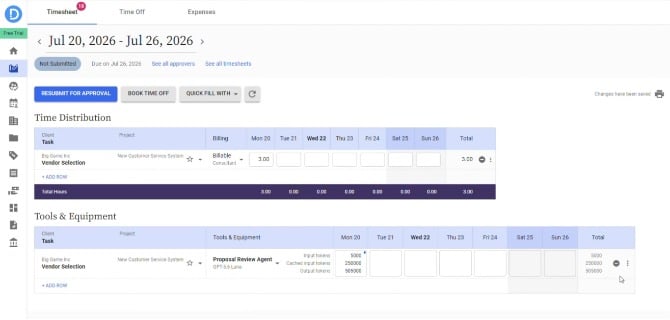
Capture AI and Equipment Costs Alongside Labor
Strengthen Mobile Security with Session Timeout Controls
For organizations using Single Sign-On (SSO), maintaining secure access across mobile devices is increasingly important. Replicon now allows administrators to apply session timeout settings to mobile applications, ensuring users are automatically logged out when their authentication session expires or is revoked. Depending on the authentication method used, employees can either be automatically reauthenticated or redirected to their organization's identity provider for login.
This enhancement helps organizations strengthen security policies without creating unnecessary friction for end users. By extending session management controls to mobile experiences, companies can better protect organizational data while ensuring authentication policies remain consistent across web and mobile environments.
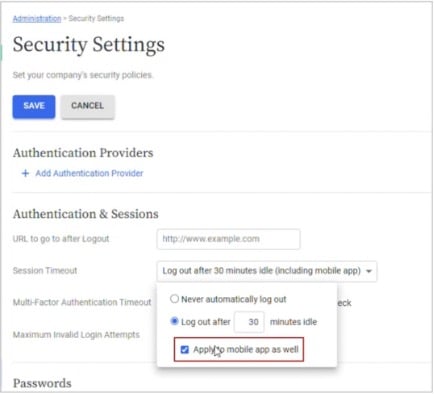
Strengthen Mobile Security with Session Timeout Controls
Improve Accuracy with Enhanced Multi-Day Booking Validation
Consistency in time-off and schedule management is critical for maintaining accurate workforce records. To improve the booking experience, Replicon has updated the multi-day booking dialog so that partial-hour entries now generate validation errors instead of being automatically rounded when full-hour bookings are required. This aligns the experience with other booking workflows across the platform and provides users with clearer guidance when entering durations.
By eliminating automatic adjustments and giving users greater control over entries, organizations can improve data accuracy, reduce confusion, and ensure workforce records more closely reflect scheduling policies and employee intent.
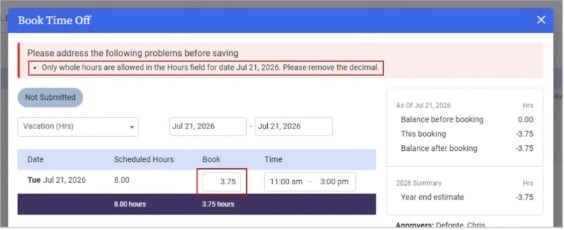
Multi-Day Booking Validation
Deliver More Personalized Experiences with My Schedule Widget Permissions
Not every user requires the same homepage experience. A new permission setting now allows administrators to control visibility of the My Schedule widget, making it easier to tailor homepage layouts for different user groups. Administrators can show or hide the widget through user permission settings without affecting scheduling data or other application functionality. Existing customers retain the current experience through automatic migration of permissions. This added flexibility helps organizations create cleaner, role-specific user experiences while ensuring employees have access only to the homepage components most relevant to their day-to-day responsibilities.
Stay connected
Replicon Time’s Q3 2026 enhancements are focused on reducing friction across the entire time and workforce management experience. Employees get simpler ways to capture and complete their time, administrators gain more flexibility and control, and managers and compliance teams get earlier visibility into potential issues. Together, these capabilities help organizations improve accuracy, strengthen governance, and make better-informed workforce and project decisions. To see these capabilities in action and learn more about what’s new, register for the Q3 Replicon Customer Town Hall.