


The time spent on each task or activity can never be recovered. For this reason, it is important to make sure that your efforts are spent where they are truly needed. By letting Deltek Ajera do the work for you, that valuable time can be spent on more profitable tasks.
There are many ways to improve productivity by using Deltek Ajera, but let’s look at five ways to increase efficiency and streamline the processes that can be the most time-consuming.
#1: Find Work in Progress While Editing a Client Invoice
You may know this feeling: it is time to close a project or a project phase, but you can’t because the work in progress (WIP) is still showing on the snapshot report or other project report even though you don’t see it on the current invoice. The most common cause of this is having entries with a status of ‘hold’ sitting on an invoice. The best way to avoid this is to always be aware of your current WIP and the status of those entries.
On your dashboard, start with a transaction base table widget and add columns for project ID & description, phase ID & description, status, employee, date, units/hours and cost amount.
Then, group the results for the project ID & description and the phase ID & description columns.
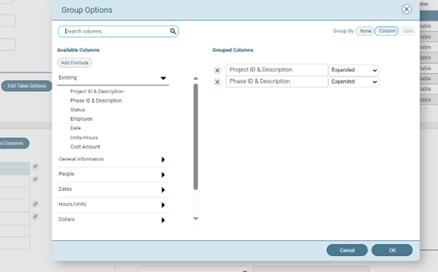
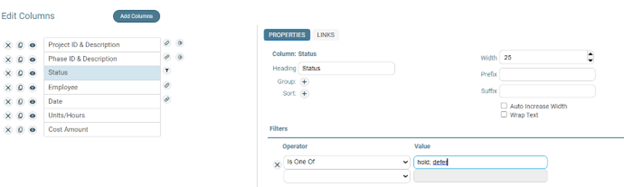
Filter the status column to “is one of” with a value of “hold; defer.”
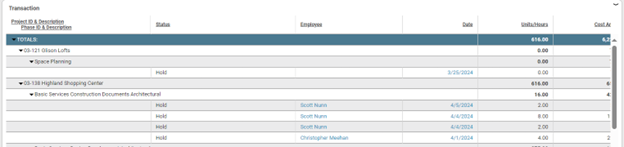
Now you will always see the ‘what, where, when, and for whom’ on the WIP.
#2: Determine Timesheet Entry Date vs. Accounting Date
Correctly tracking the time employees spend on tasks facilitates accurate resource forecasting and client invoicing. It also may be required by your contract. It is important to know whether timesheets are completed in a timely manner and by whom. In doing so, it is key to determine the date that a timesheet entry was made versus the accounting date of that entry. An easy way to do this is through a dashboard widget.
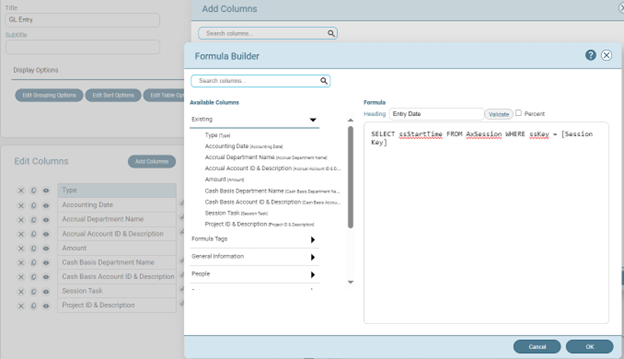
Start with a GL base table widget and add the standard columns as needed. Then, use a formula to pull in the actual session date (entry date) for every entry like this:
Add additional standard columns for session employee, employee name, timesheet date and employee name. You will also want to group results on the employee name and the timesheet date columns. This results in a widget that will look like this:
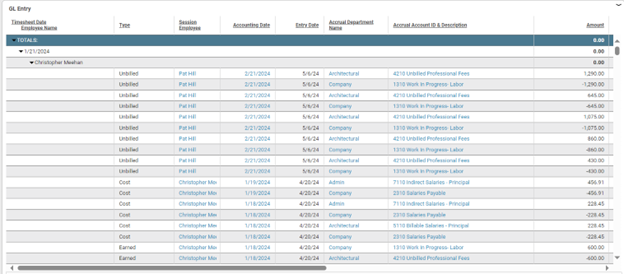
Now, you can quickly see when the timesheet was filled out and by whom.
Customer Town Hall
See What's Next for Deltek Ajera
Join Deltek experts and fellow customers each quarter to discuss product vision, recent releases, and how our Ajera fits your goals.
#3: Uncover Out-of-Period Ledger Entries Impacting Financial Reporting
The #1 cause of an Ajera trial balance to go out of balance is entering GL changes into a closed fiscal year without re-opening and re-closing that year. Using a similar method to find out-of-sync timesheet entries, you can use the GL entry base to find out-of-period ledger entries.
For this situation, using a new table widget (GL Entry base), add the standard columns desired along with the formula column for the “entry date.” SELECT ssStartTime from AxSession WHERE sskey = [Session Key].
Next, add another formula column to signal when the entry date and the accounting date are in different years. This formula is a bit more complex: CAST ((CASE WHEN (Datename(yy, [Accounting Date])) <> (Datename(yy, (SELECT ssStartTime from AxSession where sskey = [Session Key])) )THEN 0 ELSE 1 END)AS bit).
This will create a checkmark in the column whenever the entry date year and the accounting date year match.
Now you can track down those entries that may be throwing off your trial balance as well as your other financial reporting.
#4: Discover Up-to-Date Project Budget Variances
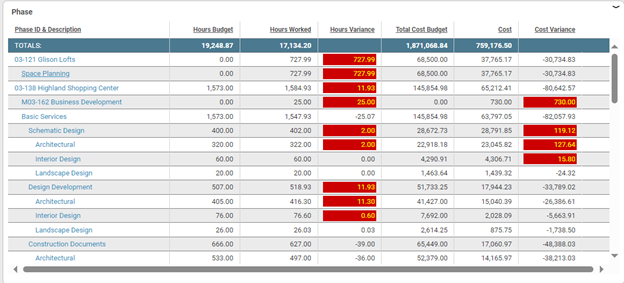
Finding up-to-date project budget variance for cost and hours can be achieved by using a phase base table widget. Create a new Phase Base table widget. Then add columns for phase ID & description, hours budget, hours worked, total cost budget and cost.
Then, add a formula column with the formula: -1 * ([Hours Budget] – [Hours Worked]).
Change the formula column heading to “Hours Variance” and in the properties of that column, click on the “display totals” check box.
Add another formula column and add the formula: ([Total Cost Budget] – [Cost]).
Change the formula column heading to “Cost Variance” and in the properties of that column, click on the “display totals” checkbox. Then, save the widget.
You can also add conditional formatting to the variance columns to make it easier to see where you are over budget.
#5: Determine Status and Billing Rates for Each Phase
Many times, businesses experience issues with client invoicing. Examples include entries having different billing rates for the same person and employee type on the same project or an expected phase that doesn’t show on the invoice. In most of these cases, the cause comes down to the billing rate table being used and the phase status.
Rather than going to the project and looking for the phase information by clicking one-by-one through the subtabs in the Project Command Center (PCC), you can display that type of information along with the phases.
Using the PCC’s customize options, you can control what information is displayed for the project phases on the left-hand side of the project info tab. Select a checkbox to add a column to the information for each phase.
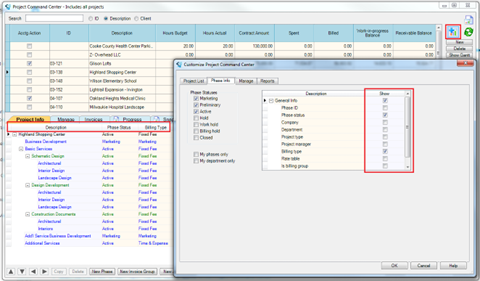
Now, you can see all the phases along with the associated status and the billing rate table used and quickly determine if there are unexpected billing rate tables or phase statuses creating the issues.
Want to Learn More?
If you want to learn more ways to maximize your use of Deltek Ajera, check out the Deltek Learning Zone or email the Deltek Consulting team at AjeraConsulting@Deltek.com. The Ajera Deltek Consulting team can help your business adopt best practices and optimize your system's set up with some packaged offerings, such as:
- All About WIP – The benefits of managing WIP and understanding the impact on financial report
- Ajera Change Management – How to improve user adoption within your staff and maintain best practices.


