A manufacturing floor is a data- and labor-intensive environment where precision is everything. For shop floor managers and supervisors, accurately tracking and capturing labor hours against specific project objectives is crucial to prevent reporting errors, cost overruns and noncompliance. Managing punch in and punch out events while complying with complex government rules and regulations, recording exceptions and flagging deviations with thorough audit trails can be challenging without the right solution in place.
Driven by valuable customer feedback, the latest release of Deltek Shop Floor Time focuses on enhancing accuracy in labor tracking and introduces features that streamline administrative efficiency, provide expanded oversight, and improve workflows across various systems and devices for a more optimized user experience. These updates, developed with our customers in mind, facilitate strict compliance with government regulations, labor laws and company policies, reduce administrative burden, and offer greater transparency and control for managers and executives. With these improvements, manufacturers can make more informed decisions to effectively manage their workforce.
Furthermore, improved labor tracking ensures that precise data is seamlessly communicated back to Costpoint, where projects, people, finances, and compliance are centrally managed. It is an all-in-one solution, which connects project data and processes while bringing time-saving automation and innovative AI capabilities to make the entire project lifecycle smarter. With its built-in functionality and a compliant framework, manufacturers can meet complex government regulations to help deliver projects on time and on budget.
Ensuring Accuracy of Various Punch Events
Mandatory Meal Rules Updates
This feature enforces mandatory meal rules by monitoring Punch Events, which records employees’ clock-in and clock-out times. When an employee posts a Punch Event, the system verifies if the mandatory meal break has been taken. It detects Late or Short Meals by comparing the actual meal break times with the scheduled ones. If a meal starts late or ends early, the system flags it for further actions such as reporting or notifying the relevant parties. Additionally, it helps ensure compliance with state regulations, such as California's meal and break rules, by automatically tracking and enforcing required breaks.
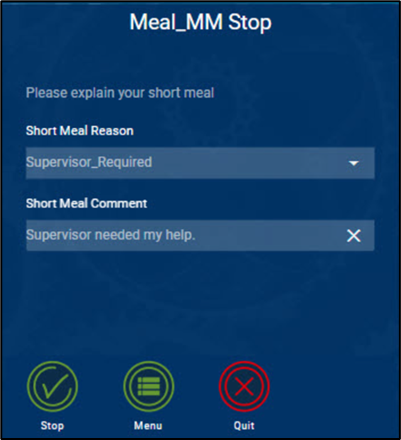
Late and Short Meals are detected when meals are started or stopped
Import Punch Duration Actions
This new customer-driven feature streamlines the process of logging work hours by automatically calculating the end time based on the start time and total hours worked entered by the employee. It minimizes errors from manual calculations, leading to more accurate time tracking and payroll management. It is particularly beneficial for employees, such as planners or quality inspectors, who don’t need to clock in and out regularly (exempt employees). The system also accounts for meal breaks and ensures shifts are properly recorded, enhancing the overall management of work schedules and compliance.
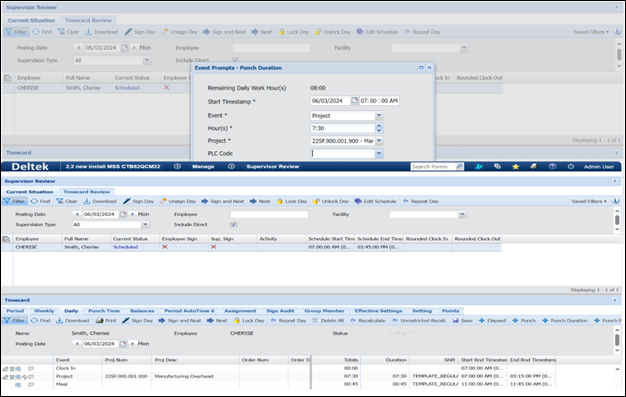
Shop Floor Time automatically calculates the end time and meal breaks based on the start time and hours worked entered by the employee
Out of Order Punches
This customer-requested feature improves time tracking by managing out-of-order punches, which occur when employees forget to clock in or out at the correct times. Anomalies are flagged in an action table for administrators to review and correct, ensuring accurate timecards, payroll, and compliance with labor laws. This enhances efficiency and accuracy, simplifying the management of time tracking issues.
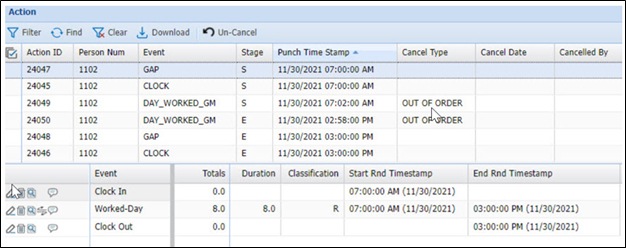
Out of Order punches will be placed into the action table and updated accordingly on the timecard
Elapsed Add Comment for Previous Day
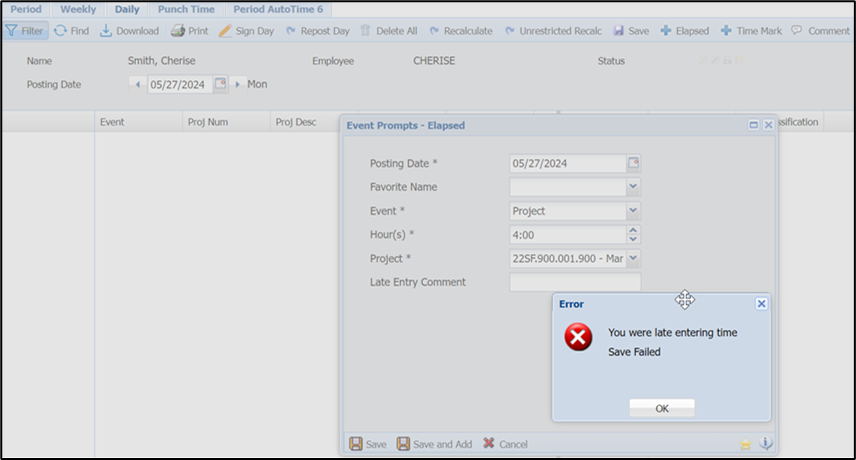
When an elapsed employee attempts to add hours for the previous day, a comment is required. If there is no comment, the transaction will not save
With this new feature, when elapsed (salaried) employees add hours for the previous day, they must provide a comment explaining the adjustment. If no comment is provided, the system will not save the transaction. This ensures transparency and accountability, maintaining accurate records and promoting fair labor practices.
New Timecard Check Operands
In response to customer feedback, this release introduces two new timecard check operands to support the reconciliation of attendance and labor hours. These operands ensure that recorded attendance (clock-in and clock-out times) matches the actual labor hours worked, as posted in the web timecard. By cross verifying the timecard at the time of signing, the system maintains accuracy and consistency, ensuring that attendance and labor hours are aligned. This feature is particularly useful for scenarios where employees clock in at a terminal but log their work hours separately.
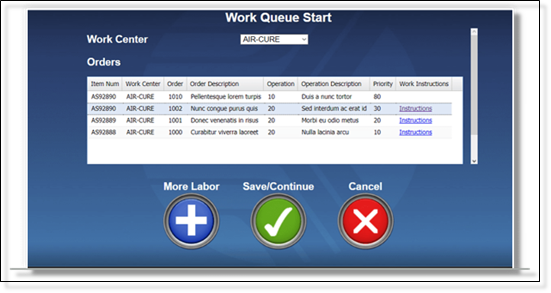
Two new Timecard Check operands have been added to support the reconciliation of attendance and labor hours in the timecard
Streamlining Administrative Tasks and Oversight
Indirect Supervision
Higher-level managers can now view their indirect employees, allowing them to monitor the work of employees under their broader supervision. The new “Indirect Supervision Service” defines the permissions and access rights of indirect supervisors, determining whether they can view, edit, or manage relevant data. This feature, developed in direct response to customer needs, enhances transparency and oversight, leading to better workforce management, accountability, and more effective decision-making regarding resource allocation.
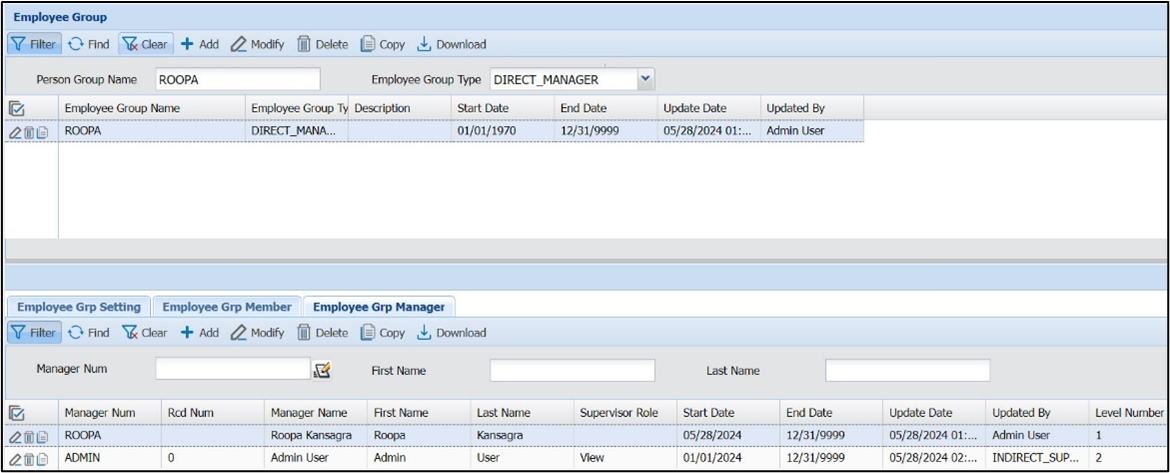
Persons one to two levels about the Supervisor can now view their "Indirect Employees”
Payroll Lock by Facility
Administrators can now lock all timecards in a facility at once, improving efficiency and control. This feature simplifies payroll management for larger organizations with multiple Policy Groups, preventing unauthorized changes and enhancing compliance. Shop Floor Time will notify Costpoint when timecards are locked and ready for posting, streamlining transactions and approvals.
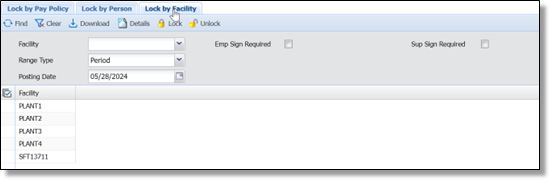
Administrators can now lock all timecards in a facility as opposed to each Policy Group
Expanding Compatibility and Improving User Experience
Form Links within Email Message Actions
This feature, again designed considering customer feedback, allows direct links to specific forms to be included in email messages. For example, a supervisor can receive an email with a direct link to the Time Off Request form, enabling quick and easy access. This enhancement streamlines processes, saves time, and improves system interactivity and user-friendliness.
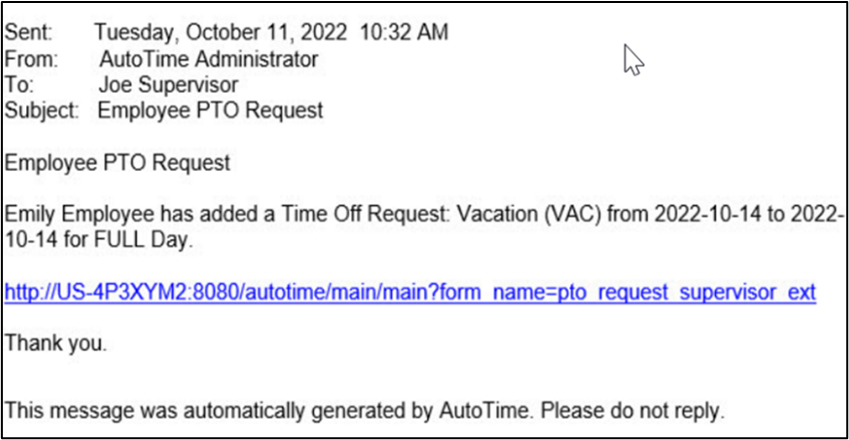
Shop Floor Time can be configured to include a form link into an email message
Expanded Browser and System Compatibility
With this release, users on Chrome, Windows Server 2022, SQL Server 2022, and Microsoft Edge on iPhone iOS will experience seamless and productive operations. This ensures a wider compatibility and underscores our commitment to a user-friendly experience across all platforms and devices.