Maintaining profits and keeping jobs on track is not easy in the construction industry. There are bills to pay, materials to order, teams to manage, and everything else in between. That's why you need accurate, real-time Work in Progress (WIP) reports to keep projects running smoothly—and to grow your bottom-line profit.
So, how does it all work? In this article, we'll deep-dive into all there is to know about WIP reporting and how you can set your projects and business up for success.
What is Work in Progress (WIP)?
Work in Progress (WIP) is an essential part of construction accounting. It calculates the progress of all ongoing work, allowing you to see what's been done and what's left to do—helping you manage budgets effectively. This information can then be used to generate reports and track project development using "percentage complete" figures.
For example, if a WIP report shows that a project is 30% complete but has used up 70% of its budget, you can likely predict it'll go over budget. As such, this encourages a more proactive than reactive approach to project management, allowing companies to take action before it is too late.
In addition, WIP reporting enables you to create accurate financial statements that outline exactly what was spent on individual projects and where. This can then be used to inform wider decision-making, especially concerning the business's overall financial health and growing bottom-line profits.
Guide
How WIP Can Work For You
Learn how accurate construction work in progress (WIP) reports help keep projects running smoothly and grow profits.
How to Calculate Work in Progress
Calculating WIP allows you to see whether a project has been over- or underbilled.
- Overbilling happens when you've charged more than needed for the work completed. While this can positively impact cash flow, it could also mean that the work is being completed slower than expected, rather than just being billed in advance. It may also leave contractors out of pocket further down the line if they're unable to finance jobs later in the project.
- Underbilling occurs when contractors bill less than the amount earned for the work completed to date. This can be problematic due to negative cash flow and leave you responsible for financing the rest of the project.
In order to calculate whether a project is over- or underbilled, you'll need to know the projected cost at completion or revised estimate. Once you calculate your projected cost, you can calculate the percentage of work completed to date and the earned revenue to date.
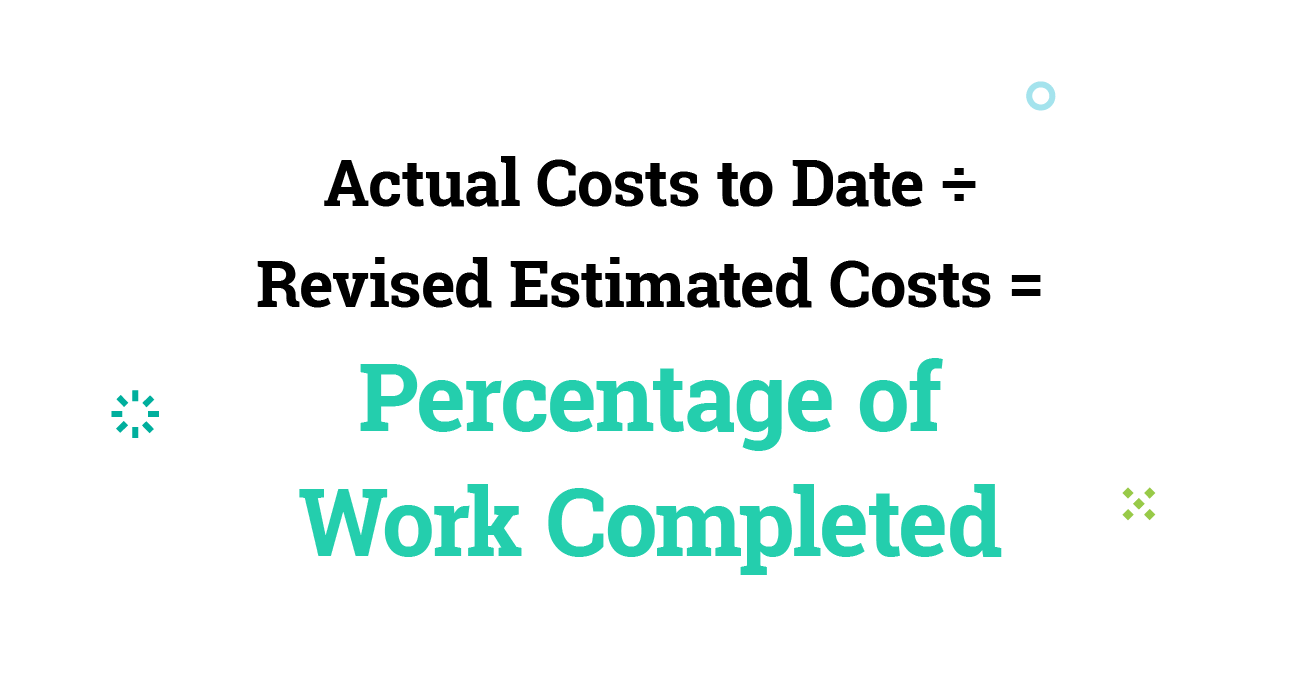
The percentage of work completed is calculated by dividing the actual costs to date by the revised estimated costs.
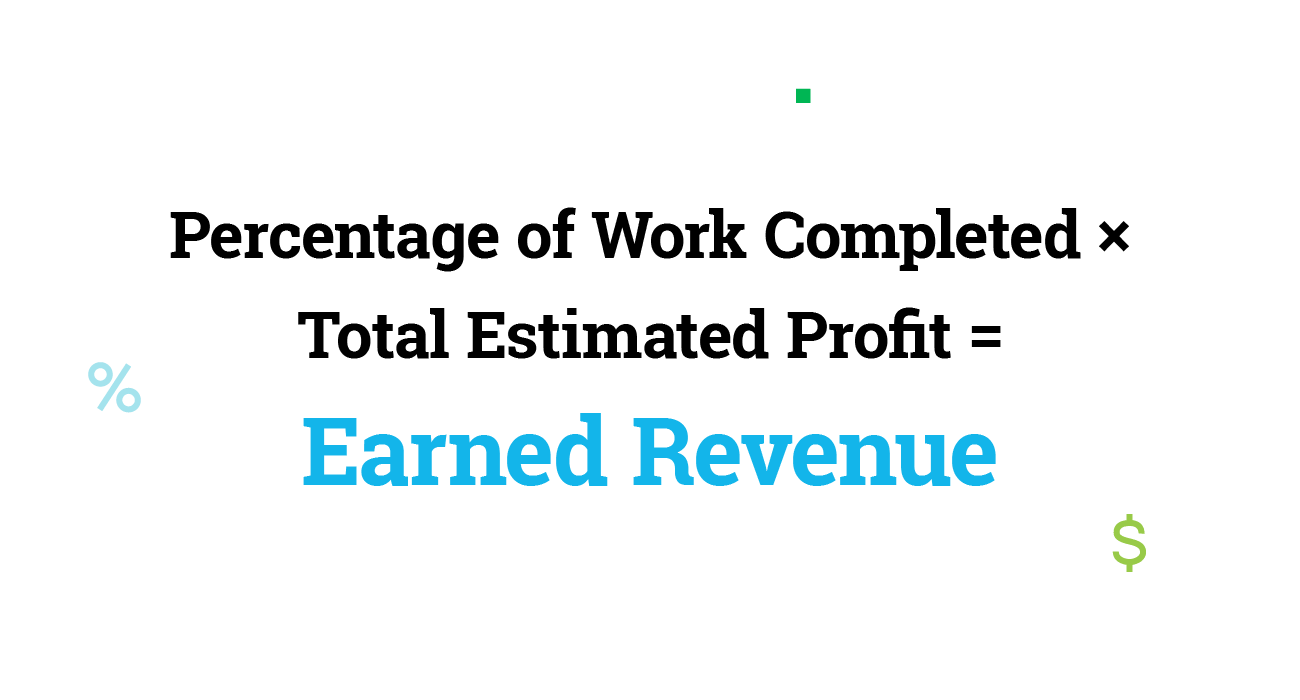
You can then use the percentage of work completed figure to calculate the earned revenue, multiplying it by the total estimated profit (Contract Amount minus Revised Estimated Costs equals estimated profit).
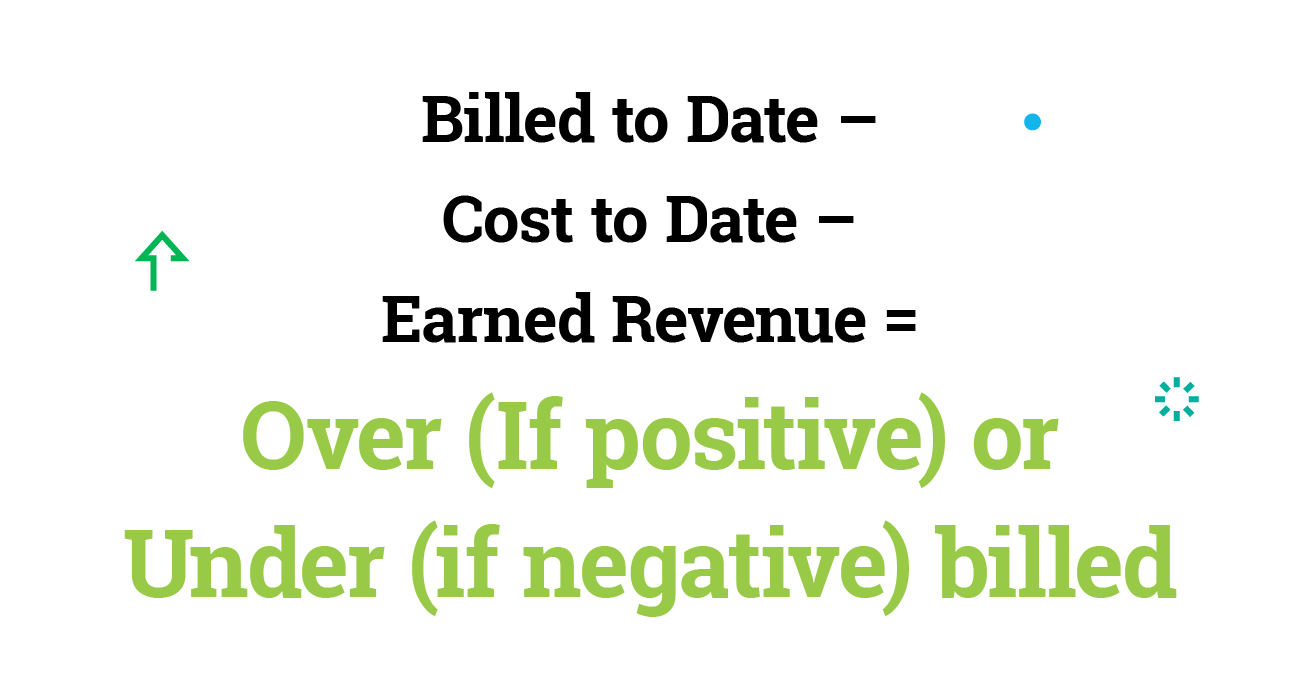
You can then calculate the over-under billing by subtracting the earned revenue to date from the (total amount billed minus the total cost to date).
WIP Example
Let's work through a Work in Progress example to show you how it works in construction.
We'll use a fictitious company named "Construction Ltd". They're running a project involving a new house build, with a total contract value of $2,000,000.
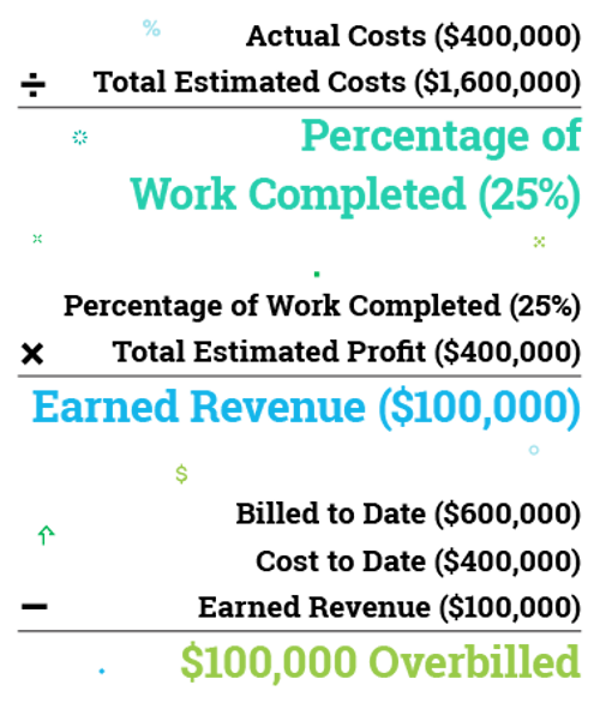
Construction Ltd calculates the actual costs to date as $400,000, and they have billed $600,000 to date. They estimated total costs of $1,600,000, indicating a 25% completion rate.
To calculate the earned revenue to date, Construction Ltd then needs to multiply the percentage complete (25%) by the total estimated profit ($400,000). This means the business should have earned revenue to date of $100,000.
Subtracting the earned revenue to date ($100,000) from the amount billed ($600,000) minus cost to date ($400,000) leaves a value of positive $100,000. This means Construction Ltd has overbilled the project by 100,000 dollars.
What Should a WIP Report Include?
So, we know that WIP reports show a construction project's status, but what information do you need.
Generally, WIP reports should include:
- The total current value of the contract
- The total original estimated costs
- Revised estimated costs
- The total costs to date
- The amount of revenue received to date
- The amount billed to date
- Percentage completion of the project
- Whether a project is currently over- or underbilled
How Often Should You Run a WIP Report?
It all depends on your business goals. If you run regular financial reports and have a lot of ongoing projects, you may decide to create WIP reports monthly or weekly. Other businesses may opt for quarterly WIP reports, while some only run them at the end of projects.
However, if you run a WIP report based on the previous week or month's data, your decisions are already a week or a month behind actual costs, leaving you unable to make critical decisions in time-sensitive situations.
It's best practice to create a company-wide WIP report and a WIP report for each job to give you greater oversight of your company's well-being and of individual project progress.
“Consistently running WIP reports is not just a task; it’s a commitment to clarity—ensuring that every project stays on track, evolving from plans on paper to resilient structures.”
Webinar
How Work in Progress Can Drive Profitability and Cash Flow
Learn why an accurate and timely WIP report is one of the most essential tools a contractor can use to optimize cash flow.
WIP Calculation Methods
The key component of the WIP report is the projected cost, which is needed to calculate the percent complete.
The percent of budget spent is very rarely an indicator of the actual percent of work completed, so rather than use the percent of budget spent as the percent of work completed, many businesses use additional methods to calculate their projected cost when creating their WIP report.
The three most commonly used methods to calculate projected cost are estimating the percent complete to date, using units completed to date, or estimating the cost to finish.
- Percentage complete: Track progress using the estimated percent complete to calculate the revised total estimated cost
- Units complete: Compare the number of units completed with the total amount of units budgeted to calculate the percent complete, and then use the percent complete to calculate the revised estimate
- Cost-to-finish: Add the total amount spent to date to the estimated cost to finish to calculate your revised budget
Common WIP Report Mistakes To Avoid
WIP reports are only reliable when used correctly. It's easy to simply compare the total costs spent to date with your estimated budget and assume that a project is running smoothly if those costs have not exceeded your budget.
But, using multiple calculations, you can see a more accurate picture of a project of where the job stands, including if it's been over- or underbilled.
For instance, you may assume that a project is 60% complete simply by comparing the costs to date with your estimated budget. But the percentage spent doesn't mean the percentage complete. While you may have spent 60% of your budget, the work could be only 40% finished.
Keeping on top of your WIP report using multiple calculation methods is therefore crucial for accurately scoping projects. This allows you to identify potential problems early, such as chasing overdue invoices or re-evaluating budgets when costs are adding up.
Here are some other WIP pitfalls to avoid:
Not Tracking Committed Costs
Committed costs are those you are committed to paying, such as employee wages or material or subcontract costs that you have committed to with a purchase order or subcontract agreement. These need to be accurately tracked to ensure your project remains profitable and the WIP report is accurate.
Entering Figures Incorrectly
It's easy to miss an extra zero or to enter a "4" instead of a "5." Incorrect figures due to human error can significantly affect WIP data and subsequent calculations.
Not Running Regular WIP Reports
WIP reports need to be created regularly to keep track of job progress and ensure they run efficiently. Otherwise, budgets may be exhausted before you even have a chance to rectify the issue.
Using Overbilling as Profit
Overbilling is not profit; it's cash flow to be used for future scheduled work. If businesses use this for a profit, it may leave projects without funds to continue.
Not Linking the WIP with P&L Statements
Using WIP reports helps you identify over- and underbilling. These must be reflected in the business's profit and loss statement and balance sheet to provide an accurate snapshot of its financial health.
Delayed Tracking of Expenses and Costs
Tracking expenses and costs in real-time makes your WIP more accurate. Otherwise, the budget may show a profit, but you're forgetting to account for expensive bills that haven't been added yet.
Guide
Why Contractors Outgrow Generic Accounting Tools
Learn why purpose-built construction accounting software delivers better visibility, control, and confidence as your job volume and complexity grow.
How Construction Accounting Software Can Help
Manual data entry and calculations are time-consuming and leave plenty of room for error. So, investing in construction accounting software such as Deltek ComputerEase is a good idea to help things run smoothly and avoid errors because it is automatic.
The right software will provide you with real-time updates on project progress, so you can accurately keep track of jobs and budgets. Importantly, accounting software allows you to identify problems before they affect the progress of a job and eat away at your profit margins.
Tight deadlines and thin profits mean you can't afford errors or delays in construction WIP reports. So, making sure you select the right software is crucial.
What To Look for When Selecting Construction Accounting Software
When choosing construction accounting software, consider the following:
- Ease of setting up new projects and managing ongoing jobs
- If all aspects of accounting, such as payroll, accounts payable, and accounts receivable, are fully integrated
- Whether you can easily generate forms such as bills, invoices, purchase orders, and work orders
- If the software is flexible and scalable for your business needs
- How the software keeps track of expenses and costs in real-time, especially those in the field
- If you can generate individual reports alongside the overall WIP report, such as total labor costs
- How the software streamlines processes and jobs as you move through a project
- If the software uses data integration between modules, or if some manual input is also required
How Deltek Supports the Construction Industry
Deltek ComputerEase is the leading construction software provider of job cost accounting, project management, and payroll services—delivering solutions that help customers connect and automate the project lifecycle that fuels their business. Deltek ComputerEase’s specialized work-in-progress reporting helps contractors track progress on every job.
If you are currently using a generic accounting solution that's built for standard accounting processes, you will undoubtedly benefit from switching to Deltek ComputerEase, a dedicated construction accounting solution that includes WIP reporting. Contact us today to learn how Deltek ComputerEase can help you to boost your profitability.