We are excited to announce the release of Deltek PM Compass 8.5. This release brings numerous enhancements aimed at improving user experience. These updates focus on providing work owners with quick and accurate information, enabling them to complete their tasks efficiently while maintaining discipline and transparency throughout the entire process.
Release Highlights
User Experience Improvements
Among the highlights are several minor but impactful changes to the user interface, designed to simplify operations and significantly reduce the need for re-keying data during the monthly progress cycle.
Features include:
Expanded Navigation Menu—Users can now display the Navigation Menu in expanded form upon Login. This allows you to quickly access important features without navigating through multiple menus to gain immediate access to essential navigation elements.
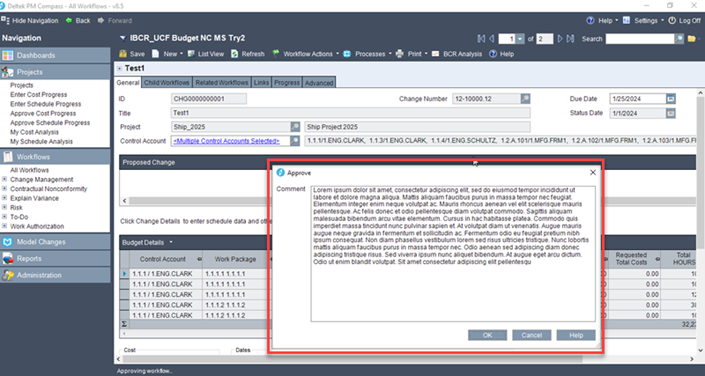
Room for More Details—Users now have more space to explain their actions, such as approving, rejecting, suspending or canceling a workflow, improving communication and documentation processes with an increased character limit of 1,000 in the Comments dialog box.
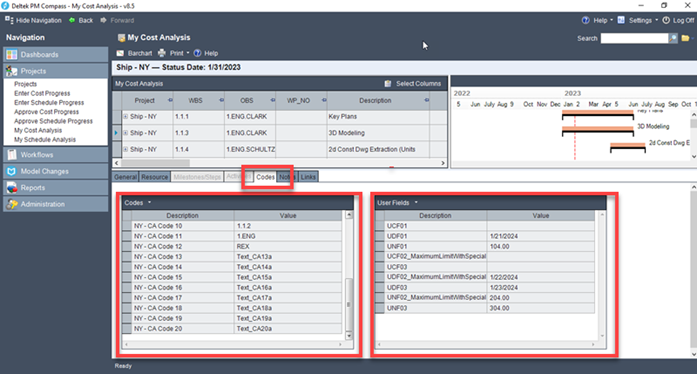
Combined Codes and User Fields Tabs—The unified Codes tab with separate grids for codes and user fields makes it easier for users to manage their data, simplifying the data entry process and improving usability.
Simplified Views—You can now hide the values utilized in computing results on the Explanation of Variance Form. This will help simplify information for individuals outside the business management domain. Users can selectively hide the results used to compute amounts, making the information more accessible.
Enhanced Text Label Display—To improve the readability of long labels within Workflow Type Configuration (WTC), they are now displayed on a single line with ellipses, and users can hover over them to view the complete label.
Integration & Flexibility Enhancements
One of the most exciting additions is the introduction of our first public API. This powerful solution allows clients to easily import bulk progress data and integrate the PM Compass workflow with external work management systems.
Our development also prioritized features that will positively influence our users' daily routines, offering greater flexibility in system mapping and the use of external spreadsheets and tools.
Features include:
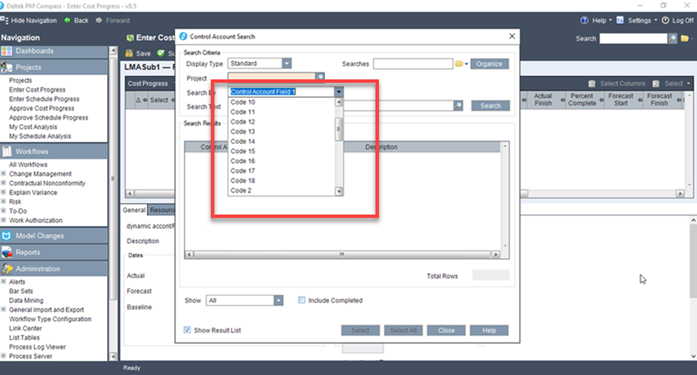
Support for all 20 Cobra Codes—To provide comprehensive support for control account codes and work package codes, users can now display all 20 codes in various areas within the application.
Support for 20 Schedule User-Defined Fields—To offer greater flexibility in configuring user fields, users can configure up to 20 character, number, date and code fields, enhancing customization.
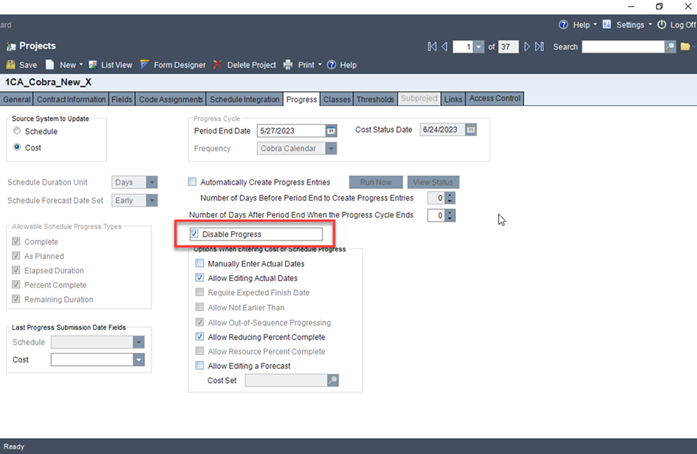
Ability to Disable Progress—Clients can easily disable and re-enable progress for selected projects to allow time analysis and mitigation without concerns about changes to progress entries.
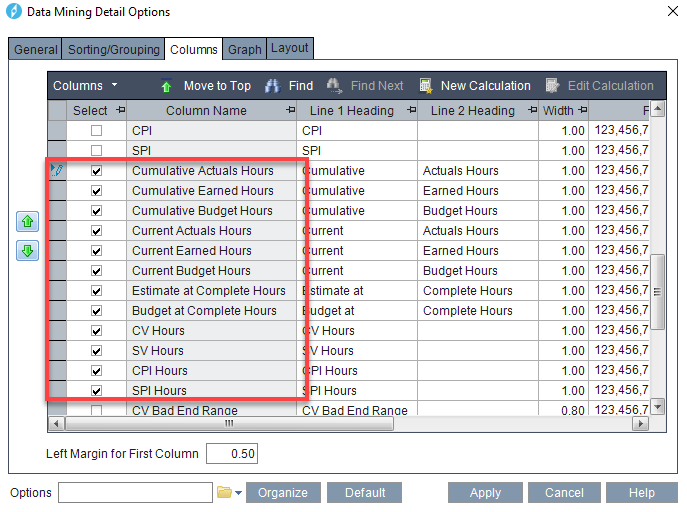
Report Updates—To provide more detailed insights into project performance, users can now include hours in the Data Mining Detail Report for analysis in hours.
Comprehensive EAC Workflow—To provide clear insights into cost variations and flexibility in determining ETC, the Comprehensive EAC workflow generates individual workflows for each control account, allowing users to review and compare EAC cost sets.
Import Progress API—The Import Progress API enables batch importing of progress, creating progress workflow entries for affected work owners, to reduce manual data entry when progress information is available in a different system.
Support for Azure VM & Azure SQL—To provide customers with more deployment options and flexibility, PM Compass now fully supports Azure Virtual Machine (VM) and Azure SQL databases.
Why You Should Upgrade
Almost every feature in PM Compass 8.5 was influenced by ideas submitted to and voted upon in the Idea Portal. The primary emphasis was to improve the user experience by reducing keystrokes, providing flexibility in screen layout and enhancing readability. Significant expansions in support for both schedule user-defined fields and cost codes have been introduced, much sought after by our customers using multiple schedule tools. Additionally, PM Compass now supports Azure and Azure SQL databases, addressing a frequent customer request.
Enhance Your Project Management by Upgrading to PM Compass 8.5
These updates reflect Deltek’s commitment to innovation and our focus on customer-driven enhancements. Upgrade today to experience the new capabilities of Deltek PM Compass 8.5. Stay tuned for more PPM product news and prepare to take your project management to the next level with Deltek PM Compass!