Reporting is essential to monitor the performance of your agency, so that you can make better decisions to improve future performance. In fact, organizations that are data-driven are more likely to see better results in decision-making than those who rely less on data.
With a variety of built-in reports, Deltek WorkBook has a broad ability to provide you with the data you need to make those important decisions. But we know that every agency is unique and has different needs. That’s why WorkBook includes databoards that make it possible to customize how your data is reported.
What are Deltek WorkBook Databoards?
Depending on the data you want to report, as long as it exists within your WorkBook system, you can locate it, and display it as a databoard. Databoards can be adjusted by parameters and exported to a spreadsheet or displayed as a dashboard.
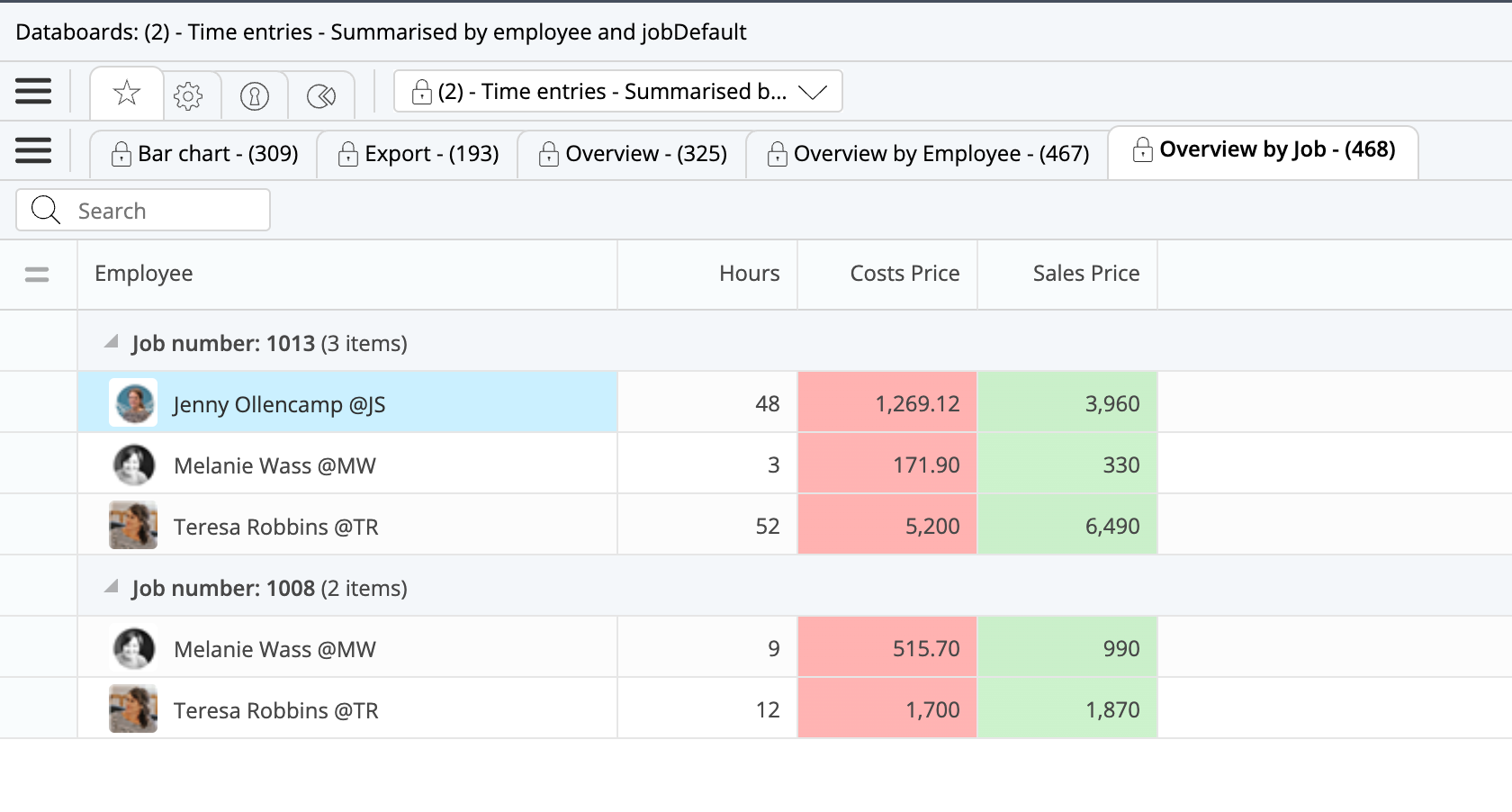
Databoards were created to help agencies solve problems such as identifying the employees who aren’t meeting capacity goals and more easily identify opportunities to improve resource planning. Or perhaps they can answer key business questions such as how the sales price of logged hours differs from the actual cost, as seen in the databoard below.
When is a Custom Databoard the Solution?
You may want to build a custom databoard if there is a requirement that one of WorkBook’s out-of-the-box reports or dashboards doesn’t immediately satisfy. Many customers create custom databoards depending on their agency operational and financial KPI’s.
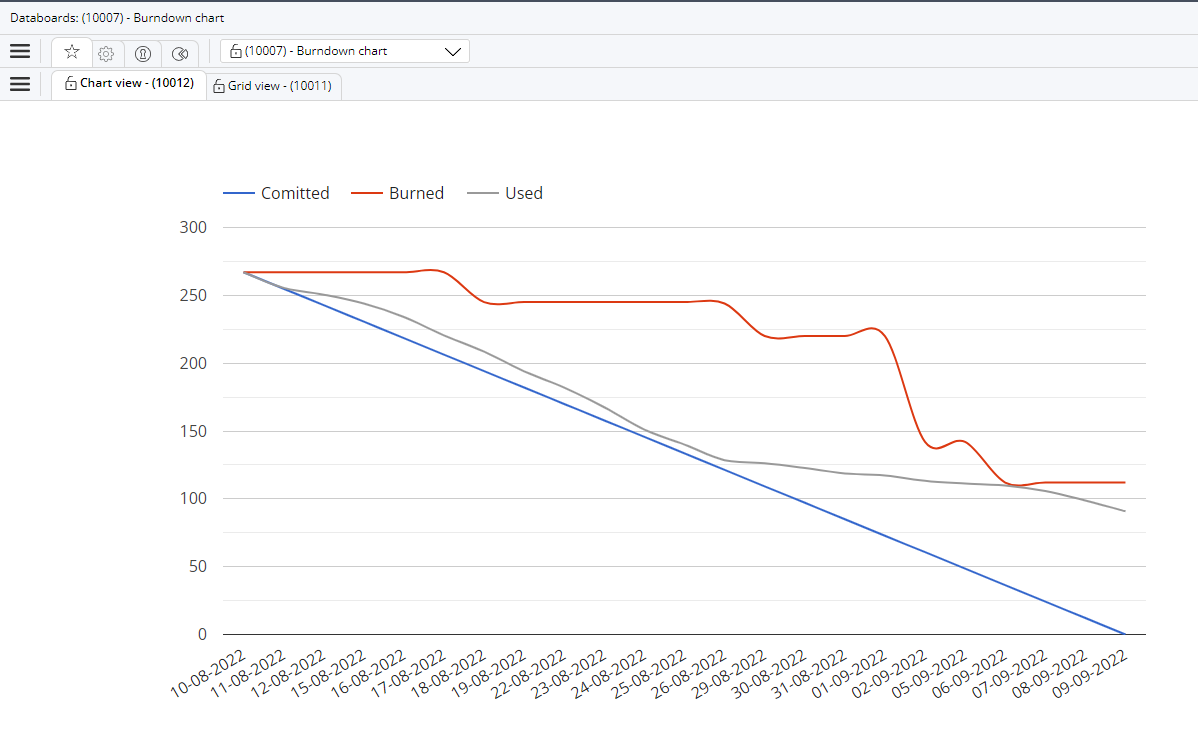
For teams that leverage a scrum workflow, like our WorkBook Engineering team, you can build a databoard to show how your team is incurring hours compared to what was planned for the sprint.
What Are Some Common Uses for Databoards?
1. Data patrol such as database maintenance or specific queries
A databoard can be used to show you specific data based on your query. For example, say that your only Junior Art Director has just been promoted, so now you need to update the latest Price Quotes/Estimates to accommodate the additional cost for an experienced Art Director. Essentially, you would need to perform a query to find where that activity is being used so that it can be replaced. You can use a databoard to show all CAMPAIGN type Jobs that include the Activity “Junior Art Director” on a Budget Line. From there it is easy to replace “Junior Art Director” with “Art Director.”
2. Custom reports and dashboards
You can use databoards to create a custom report from any data that exists within your WorkBook system. For example, you can show a ranked list of Jobs in terms of margin to show which Jobs have gone over the Price Quote/Estimate or are in danger of going over. You can create almost any kind of custom report you can imagine.
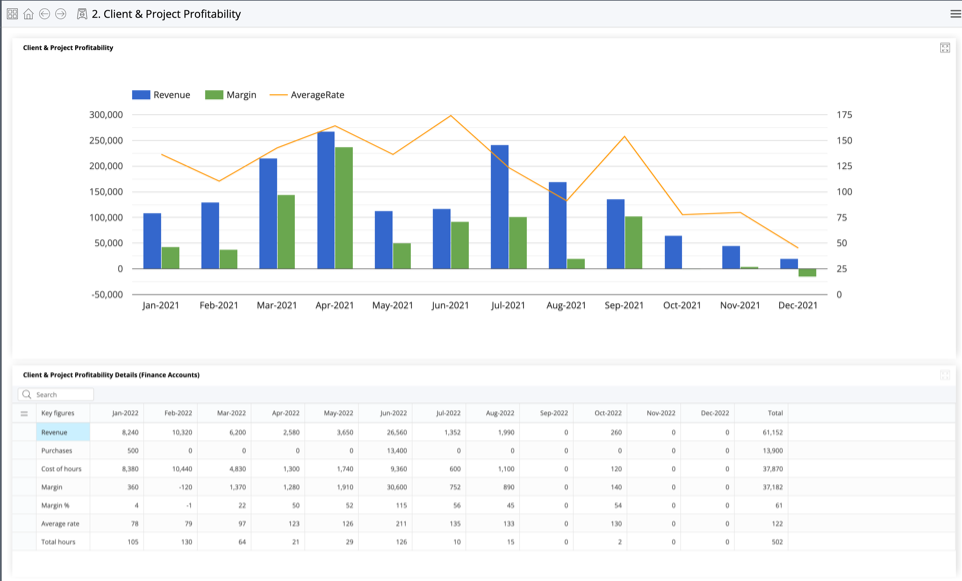
The dashboards that come preconfigured with your Power Launch implementation, like the Client & Project Profitability dashboard below, are built with predefined databoards to create a custom report of crucial agency KPIs.
3. Integrations
Databoards can be used to call data from a third-party system using WorkBook’s open API. This essentially mimics a spreadsheet you can export/import, but calls specific data from the third party, which narrows down the data for which you are asking. To note when making calls for data through the API, a databoard allows you to get all the info you need with one call instead of doing it multiple times, which saves time and minimizes the amount of data returned. Any required formatting or hard coding of values dependent on certain rules can also be generated for the third-party system.
Can You Build a DIY Databoard?
Yes. This is an out-of-the-box feature available with no additional license cost. However, it does require a bit of tech savvy and available time to execute. You can save time and frustration by reaching out to Deltek Global Consulting. Our WorkBook Consultants can design custom databoards faster and easier than doing it yourself – you only pay for time to design and test.
Documentation
Master Databoards in WorkBook
Learn how to create, duplicate, and configure databoards, manage views and parameters, and control access, all from the Advanced Tools submodule.