WorkBook 14.1 delivers one major new capability: a fully integrated Fixed Asset Register. For the first time, finance teams can manage the complete asset lifecycle: acquisition, capitalization, depreciation, revaluation, and disposal, without leaving WorkBook.
Alongside it, a handful of focused improvements sharpen integration flexibility, financial auditabiltiy, and everyday navigation.
A Complete Fixed Asset Register, Built Right In
Managing fixed assets has historically meant maintaining spreadsheets or running a separate tool in parallel with your agency management platform. WorkBook 14.1 changes that. The new Fixed Asset Register gives finance teams a single source of truth for every asset, from the moment it’s acquired to the day it’s disposed of.
The feature is enabled via Company Variable 81. Setup requires a new Journal Type for Fixed Asset postings, a Fixed Asset Suspense Account in Basic Finance Settings, and Asset Groups, each with its own GL accounts and depreciation method.
Acquisition → Capitalization → Depreciation
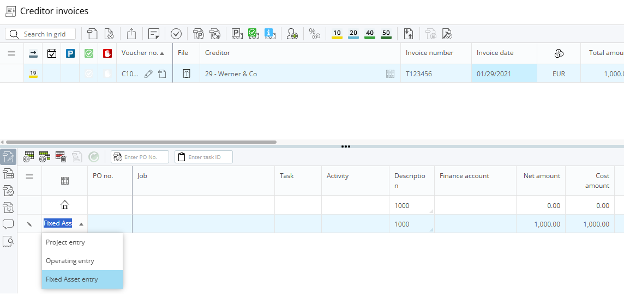
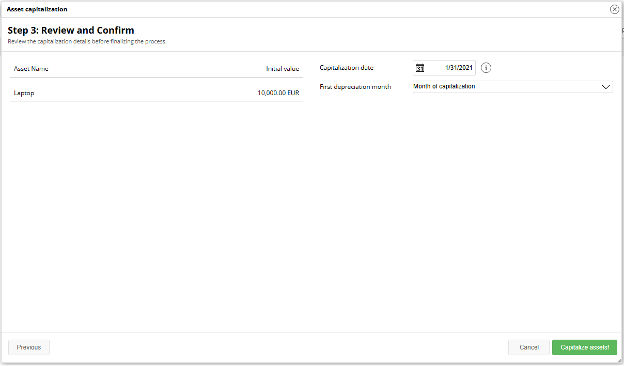
When a creditor invoice is raised, a new “Fixed Asset” line type routes the cost directly to the Suspense Account. Once the asset is created and ready, the three-step capitalization wizard selects the asset, assigns the voucher transaction, and posts an automatic journal to move value from the Suspense Account to the correct GL account. From there, depreciation is run by your finance team as a monthly process, always posting on the last day of the month, using the method defined on the asset's group.
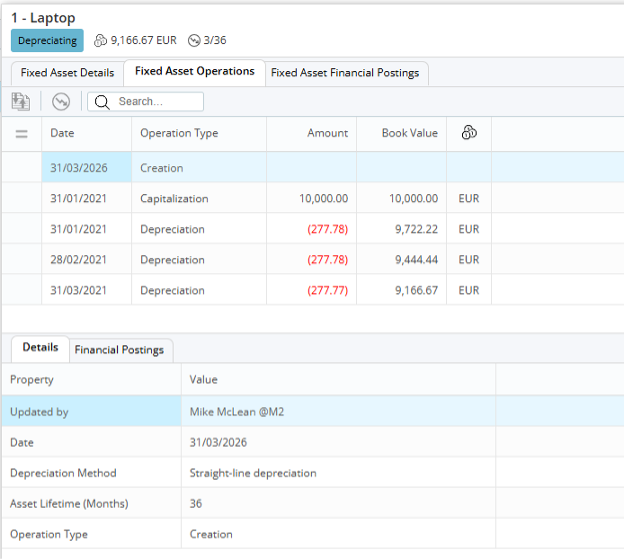
Recording a new asset purchase? Use the Fixed Asset entry line type on your creditor invoice to get started
Revaluation, Disposal & the Asset Card
Revaluation posts an adjustment journal to the Gain or Loss account set on the asset group. Disposal unwinds the asset entirely, zeroing out cost, accumulated depreciation, and any sale proceeds. Every transaction, individual journal postings and GL totals, is tracked on the asset’s own Fixed Asset Card.
Migrating from External Systems
Switching over from a spreadsheet or third-party tool is straightforward. A formatted spreadsheet can be extracted directly from WorkBook to structure existing asset data for import, and asset values can be offset against any GL accounts already in use.
More New in 14.1
External References now extend to Price Quotes, Tasks, and Sales Invoice documents, with a new RegEx Validation Tool to test configurations before rollout. Accounting Period changes are fully logged and reviewable via Report 436. And the Jobs briefcase menu item now returns you to the Job List from within any job, a small navigation shortcut that removes daily friction.
Every Asset. Every Entry. One Solution.
WorkBook 14.1 is a release that rewards agencies who take financial management seriously. The Fixed Asset Register brings a capability that previously required a separate system, natively into the platform where projects, people, and billing already live. Combined with tighter audit logging, broader integration hooks, and smarter navigation, it’s another step toward a WorkBook that handles more of the work so your team doesn’t have to.
The best is still ahead.