Ever wished you could generate polished, up-to-date project documents in just a few clicks — without toggling between spreadsheets, Word files, and your CRM? Now you can. With the new Document Automation feature in Vantagepoint CRM, creating professional, accurate, and dynamic documents has never been easier.
This powerful capability integrates seamlessly with your existing Microsoft Office applications like Word, PowerPoint, and Excel, allowing you to build custom templates, pull in real-time project data, and produce client-ready documents in minutes.
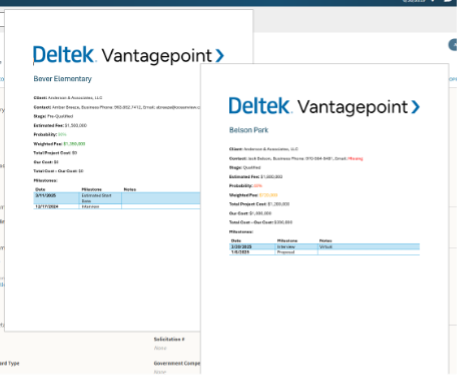
Create client-ready documents in minutes — right from Microsoft Office
Why Document Automation Changes the Game for Project Teams
In project-based businesses, teams juggle tight deadlines, client expectations, and constantly shifting project details. Spending hours manually pulling data or reformatting reports isn’t just frustrating — it’s inefficient.
Document Automation helps eliminate that manual effort by connecting your Vantagepoint data directly to your Microsoft Office documents. The result? Faster turnaround times, fewer errors, and consistent, on-brand documentation every time.
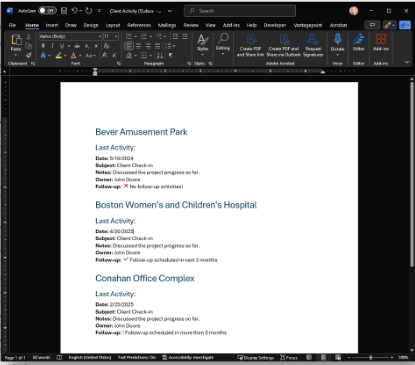
Ditch the manual busywork and start generating smarter documents
What Makes Document Automation a Must-Have in Vantagepoint
Here’s what makes this new feature so impactful:
- Template Creation with Project Data
Build templates in Word, PowerPoint, and Excel that automatically include project milestones, key contacts, AR summary info, estimate details and other project-specific details—including user-defined fields — directly from Vantagepoint CRM. - Cross-Hub Information Access
Include data from across your system, like a primary contact’s email from the Contacts Hub, a project manager’s title from the Employees Hub, or a client’s website from the Firms Hub. - Full Microsoft Office Functionality
Maintain your company’s branding by using custom fonts, colors, tables, images, and layouts. Because the templates are built in familiar Microsoft Word, Excel, or PowerPoint applications — tools your teams already use every day — it’s easy to get started. No special software or additional tools required. Plus, you’ll have access to all the formatting and design features you already rely on. - Advanced Template Capabilities
Add conditional formatting, formulas, images, and grids to make your documents dynamic and responsive — for example, automatically highlighting probability values in different colors based on thresholds. While advanced logic and formatting options are available, we recommend starting with a simple template and gradually adding complexity as you get more comfortable with the tool. - Vantagepoint Add-In for Office
Simplifies template creation with a built-in field list and wizards for adding equations and conditional logic, no coding required.
From Template to Final Document — How It All Comes Together
Getting started is quick and intuitive:
- Create Your Template
Use the Vantagepoint Add-In within Word, PowerPoint, or Excel to design your template. Add project fields, conditional logic, images, and formatting. A great way to start is by using a document you already have, simply replace key content with dynamic tags using the Vantagepoint Add-In. - Generate Documents from the Projects Hub
In Vantagepoint, select the project records you want to include, pick your template, and let the system merge the current data. - Review, Finalize, and Share
Your final document is ready — complete with accurate, current data and a consistent, professional format that aligns with your brand.
See It in Action: A Day-in-the-Life Scenario
Consider a scenario where your team needs to conduct a Go / No Go evaluation for a potential project. Rather than compiling client information, project details, and competitive evaluations manually, you can now select the project in Vantagepoint, choose your Go / No Go document template, and instantly generate a polished, branded document.
The template captures essential data points such as client evaluation scores, project risks, and competitive positioning — helping your team make informed, timely decisions with ease.
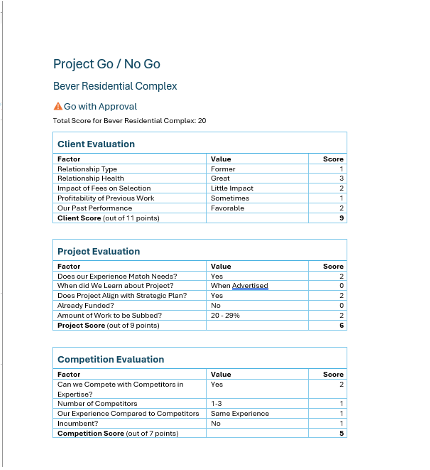
Simplify Go / No Go reviews with automated templates.
Take Control of Your Project Documents Starting Today
The Document Automation feature in Vantagepoint CRM is here to simplify and modernize your project documentation. It reduces administrative time, improves accuracy, and ensures every document leaving your business looks consistent and professional.
Discover it today and see the difference it can make in your day-to-day workflows.