Managing payroll, time off, and compliance should be accurate and predictable. Too often, they aren't, regional format mismatches force manual reformatting before every payroll run, time-off calculations require error-prone guesswork, and inconsistent time entry practices create non-compliance exposure for regulated industries.
Replicon's Q2 2026 release is built around one goal: remove the manual work that creates risk. Driven by customer feedback, this update introduces flexible payroll export formats for global teams, smarter time-off automation, and stronger controls for DCAA-aligned time entry — so your teams can operate with greater accuracy, less overhead, and more confidence.
Supporting Global Payroll Needs with Flexible Number Formats
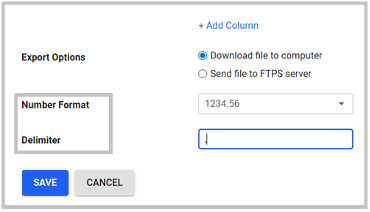
Global payroll teams often face friction when payroll export formats don’t align with regional standards. Until now, Replicon's payroll export supported the US number format only, where a period serves as the decimal separator and a comma as the delimiter. For European teams, where the decimal separator is a comma and delimiters often differ, this meant downstream manual reformatting was unavoidable, introducing unnecessary risk to payroll accuracy.
With our latest release, payroll managers can choose between the US number format (e.g., 1234.56) and European number format (e.g., 1234,56) – directly within the payroll export file configuration. The delimiter is also configurable, giving teams the flexibility to match exactly what their payroll systems expect.
Please note that the default settings remain US format only with a comma delimiter, preserving existing behavior for all existing users. To avoid configuration conflicts, the system includes an inline tooltip that alerts payroll managers when the selected number format and delimiter combination may cause parsing issues – for example, when a European decimal format is paired with a comma delimiter. The tooltip is advisory; it won't block the save, but it ensures the user has been informed before proceeding.
This capability eliminates manual reformatting that added risk to every payroll cycle and ensures Replicon can serve as a seamless source of truth for global payroll workflows.
 Support Global Payroll Needs with Flexible Number Formats
Experience Flexible Date Filtering for Payroll Time Off Data Analysis
Payroll teams often need to analyze time off data across non-standard periods such as mid-month to mid-month cycles. Until now, this wasn’t possible directly and users had to rely on workarounds such as running multiple reports across predefined periods, manually consolidating the data, or switching to separate reporting tools. This added unnecessary effort and slowed down payroll workflows.
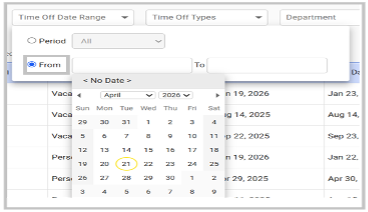
With this release, Replicon introduces flexible date filtering in the Payroll Time Off tab, allowing users to define custom date ranges with ease. Users can now:
- Either select from predefined periods
- Or select a custom “from” and “to” date range in a calendar view to retrieve the exact data they need
This enhancement simplifies data access, reduces manual effort, and allows payroll teams to focus on validation and insights rather than data preparation.
 Flexible Date Filtering for Payroll Time Off Data Analysis
Reduce Guesswork: Auto-Calculate End Date for Long Time Off Bookings
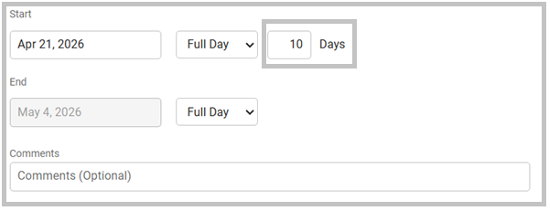
Managing long-duration time offs such as sabbaticals, parental leave, or extended medical leave often requires manual end date calculations that are both time-consuming and error-prone. With this release, Replicon helps you automatically calculate the end date based on the selected start date and number of days, eliminating the need for manual calculations.
Administrators can configure a default booking length (in days) at the time-off type level. When enabled:
- Users see a new “number of days” field in the time off booking dialog box
- The system automatically calculates the end date based on working days
- Changing the number of days dynamically updates the end date
This capability applies to working, full days only and is available for office-scheduled users. Please note that it does not apply to hourly time off, CloudClock users or calendar-day calculations. The result is a faster, more intuitive booking experience with no guesswork involved.
 Auto-Calculate End Date for Long Time Off Bookings
Ensure On-Time Reporting: Easily Schedule Month-End Reports
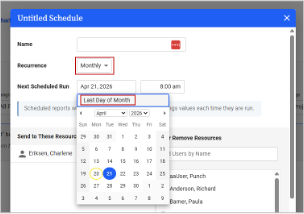
Reporting schedules rarely follow perfect calendar patterns, and “last day of the month” reporting is a common requirement across businesses. Replicon now allows users to schedule reports for the last day of each month to serve business-specific reporting needs.
Previously, users had to manually ensure reports were sent on the actual last day of each month, creating unnecessary maintenance and risk of missed or mistimed reports. This feature ensures that reports are always sent on the month-end date, regardless of month length.
 Schedule Month-End Reports
This enhancement reduces administrative overhead and ensures consistent month-end reporting without ongoing adjustments.
Manage DCAA Compliance Requirements: Prevent Time Entry on Future Dates
When users enter time in advance or fill out entire timesheets retrospectively, it leads to inaccuracies, non-compliance risks, and misaligned project data, especially for organizations that operate in strict, regulated environments.
To better support DCAA-aligned time entry practices and daily time capture expectations, Replicon now offers the ability to prevent time entries on future dates. When enabled:
- Users cannot enter time for future days
- Future dates are visually disabled with clear tooltips
Please note that this capability applies consistently across web and mobile, and it supports standard, agile, and crew timesheets. Certain population and autofill options are automatically disabled to avoid conflicts with daily time entry enforcement. This gives organizations greater control over time entry behavior, supporting audit-readiness and more accurate project costing, particularly for government contractors and regulated industries.
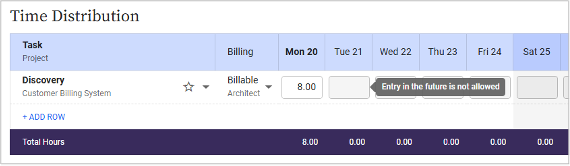 Manage DCAA Compliance
Let Users Update Their Own Time Zones
As workforces become more distributed and mobile, time zone changes no longer need to be an administrative bottleneck. With the latest release, Replicon introduces an option that allows users to update their own time zones, based on permission settings. Disabled by default, administrators can grant this capability to users through a permission setting post which users can easily update their time zone from their preferences tab. This reduces administrative dependency, minimizes delays, and ensures time tracking accuracy for employees working across regions or changing locations.
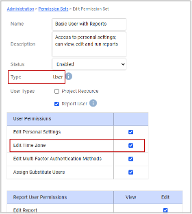 Let Users Update Their Time Zones
Align Global Leave Policies with Calendar-Based Activation
Organizations can now set default time off policies to activate on a fixed calendar date instead of relying on employee tenure. This allows companies to align all employees to the same leave year, regardless of their hire date.
With the new ‘effective on next’ option, policies can automatically take effect on a specified calendar milestone (such as January 1), while still supporting prorated accruals for employees who join mid-year. This removes the need for manual corrections and simplifies global policy management.
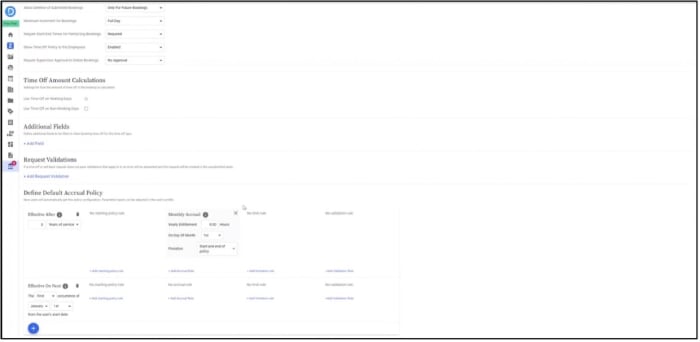 Align Global Leave Policies with Calendar-Based Activation
Meet Brazil-specific Labor Compliance Requirements with Advanced Leave Validations
Replicon introduces enhanced validation rules to support Brazil’s statutory vacation requirements, helping organizations enforce compliance without manual oversight. These updates ensure that leave bookings follow country-specific rules such as defining leave years based on employee anniversary dates, enforcing split vacation structures, and restricting bookings that violate regulatory constraints. This reduces labor compliance risk and ensures accurate policy enforcement.
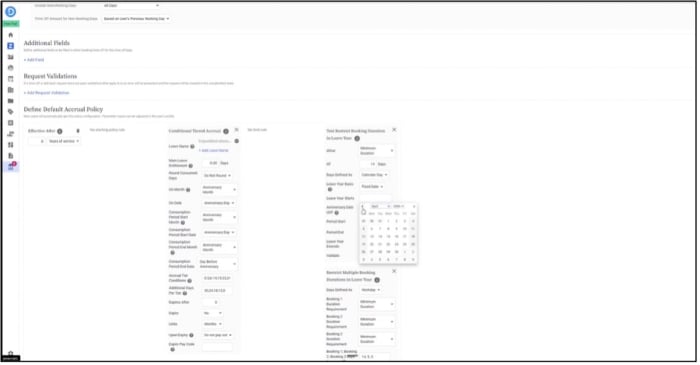 Brazil-Specific Compliance Requirements
Control Time Entry Adjustments with Advanced Reopen Restrictions
To maintain data integrity, new controls have been introduced to prevent reopening of time entries under specific conditions. Organizations can now block reopening of entries outside project timelines or for tasks where time entry is no longer allowed. This ensures that finalized project data remains protected while still allowing authorized overrides when required.
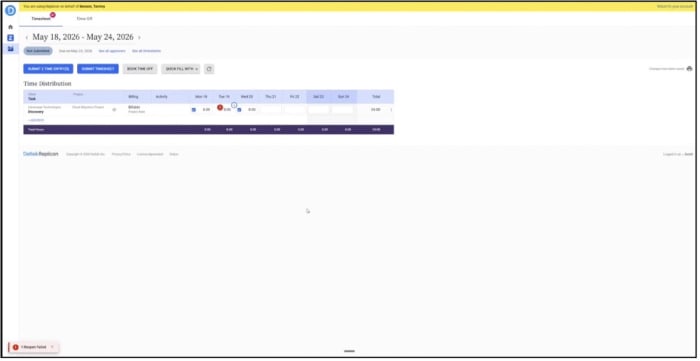 Advanced Reopen Restrictions
Limit Backdated Time-Off Changes with Configurable Restrictions
A new rule allows organizations to control how far back employees can enter or modify time-off bookings. Administrators can define allowable past booking windows using configurable limits, ensuring that all changes remain within policy guidelines and reducing the operational burden of reopening historical timesheets.
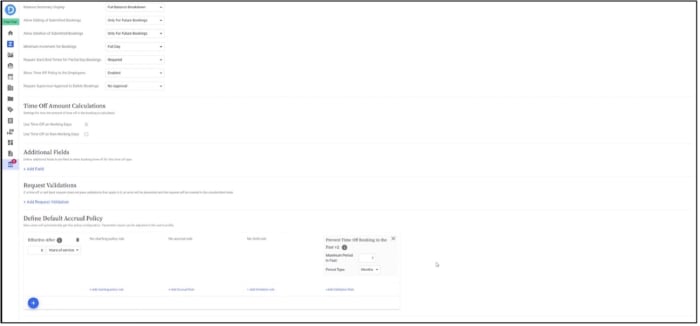 Limit Back-dated Time Off Changes
Stay Connected
These enhancements are focused on one goal: making time and payroll more accurate, flexible, and effortless for your teams. By reducing manual work, improving data access, and managing compliance requirements, Replicon continues to help organizations operate with greater clarity and control. Want to see these updates in action? Join our upcoming Q2 Replicon Customer Town Hall to explore the new features and learn how to get the most out of them.