As organizations continue to navigate evolving workforce expectations and increasingly complex labor compliance requirements, Replicon Time remains focused on delivering enhancements that make time tracking easier for employees, more powerful for administrators, and safer for global businesses. This quarter’s release brings a thoughtful mix of usability improvements, performance optimizations, and compliance-based enhancements, all designed to reduce friction while giving organizations greater control and confidence.
Here’s what’s new in Replicon Time this quarter:
Replicon Time is Now FedRAMP Moderate Authorized
Replicon Time has achieved FedRAMP Moderate Authorization, a rigorous U.S. government-validated security certification that demonstrates our commitment to data security, privacy, and compliance for organizations operating in highly regulated environments. For government contractors handling Controlled Unclassified Information (CUI), this authorization is increasingly a baseline procurement requirement, and Replicon is among the few time-tracking applications in the market to meet this standard. Replicon’s FedRAMP Moderate Authorization sits within a broader, layered compliance framework that includes SOC 1, SOC 2, SSAE 18, GDPR, NIST SP 800-171, NIST SP 800-53, and more — reflecting a consistent, organization-wide philosophy that security and privacy are foundational to how we design and operate.
See Your Entire Workday at a Glance with ‘My Schedule’ Widget
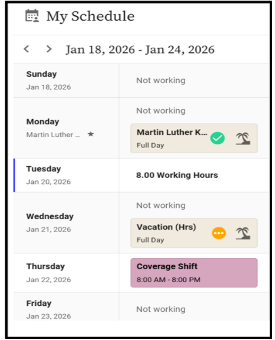
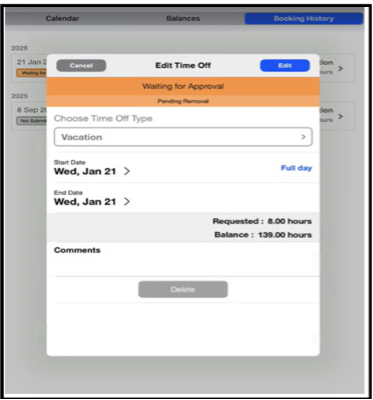
We have introduced a new ‘My Schedule’ widget on the homepage, giving employees a single, consolidated view of their day without navigating across multiple pages. The widget brings together: Office schedules, Shift schedules, and Time off entries – all displayed visually in a timelinestyle view so users can immediately understand what their day looks like. The time off blocks are interactive, clicking on them opens the full timeoff details, allowing users to review or edit bookings directly from the homepage. Shift blocks display contextual details via tooltips, while office schedules are shown for quick reference. This capability helps you to:
- Reduce time spent navigating between schedule, shift, and timeoff pages
- Empower employees as they can quickly confirm whether they’re scheduled, on leave, or working a shift
- Make timeoff actions faster and more intuitive
Bulk Enable or Disable Time Off Validation Rules
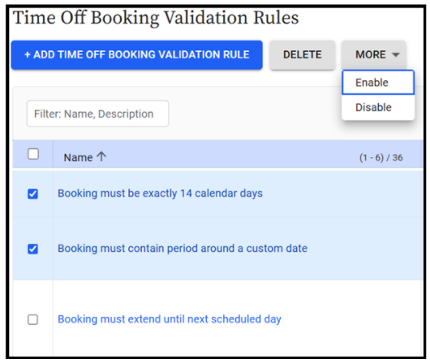
Administrators can now turn multiple validation rules on or off at once instead of updating them individually. This makes it much easier to manage policy changes, seasonal updates, or transitions — saving time and reducing errors.
Reduce Duplication While More Flexible Time Off Validation Rules
For timeoff validation rules that support parameters, those parameters can now be edited directly on the rule itself. Previously, administrators often duplicated rules just to adjust a single value. With this update, the same validation logic can be reused across scenarios without unnecessary duplication, reducing longterm maintenance overhead. It’s worth noting that most timeoff validation rules are still configured through policies or user profiles, this enhancement targets the smaller set of rules that behave more like pay rules with embedded parameters.
Capture Important Dates for Leave Policy Enforcement
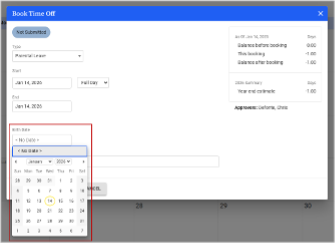
You can now capture date-based information (for eg, child’s date of birth) directly in time off bookings using a simple date picker. This allows organizations to enforce policies that depend on specific timelines, such as parental leave windows – across web, mobile, and CloudClock.
Give Employees Enough Time to Punch Accurately with CloudClock
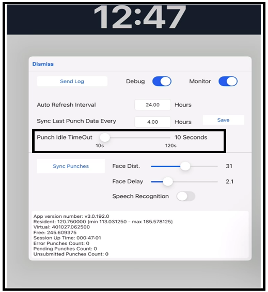
With our latest release, the CloudClock punch idle timeout is now configurable per CloudClock, allowing administrators to increase the timeout from the default 10 seconds up to 120 seconds. This change addresses scenarios where employees need additional time to review or select projects when clocking in or out.
Please note that increasing the timeout introduces a potential security consideration if a device is left unattended. Organizations should balance convenience with risk based on their operating environment.
Ensure CloudClock Follows the Same Rules as Web and Mobile
CloudClock now supports previously released timeoff workflows, including:
- Approval paths for timeoff deletions
- Visibility controls for restricted timeoff custom fields
These are not new workflows, but extensions of existing web behavior, ensuring that policies configured once are applied consistently across platforms, rather than requiring separate logic for CloudClock.
Run Time Off Reports Faster by Focusing only on What Matters
To address performance issues for customers with large volumes of timeoff data, we have optimized the Time Off Transaction Report. The report now displays only timeoff types that actually have transactions, reducing unnecessary data processing.
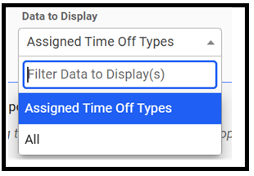
We have also refined the behavior of the “Assigned timeoff types” and “All” filters so that enabled, disabled, and inactive types are handled more efficiently, improving run times without compromising accuracy.
Eliminate Manual Cleanup in Time and Payroll Exports
We have introduced several enhancements across the Time and Payroll Workbenches:
- Performance improvements in the Time Workbench UI
- The ability to include timeoff custom fields in exports
- Separate timesheet period - start date and end date columns in Payroll Workbench file formats
This last change removes the need for manual splitting of a single period field when integrating with payroll systems that require distinct start and end dates.
Automatically Adjust Leave Entitlements Based on Usage Thresholds
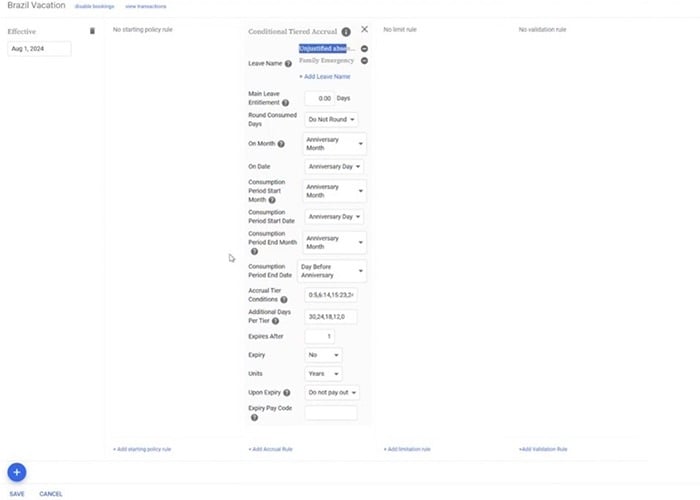
Our new conditional tier accrual rule supports scenarios where leave entitlement depends on how much qualifying time off was consumed during a defined period. An example is the Brazilian labor law, where vacation entitlement decreases based on the number of unjustified absences taken over a 12month period.
This rule:
- Applies accruals after the consumption period completes
- Adjusts balances dynamically based on configurable tiers
- Automatically recalculates when bookings are added or removed
- Has no hard limit on the number of tiers
While introduced to meet Brazilspecific compliance needs, the rule is reusable for other tierbased accrual scenarios.
Prevent Invalid Overtime Requests Before They’re Submitted
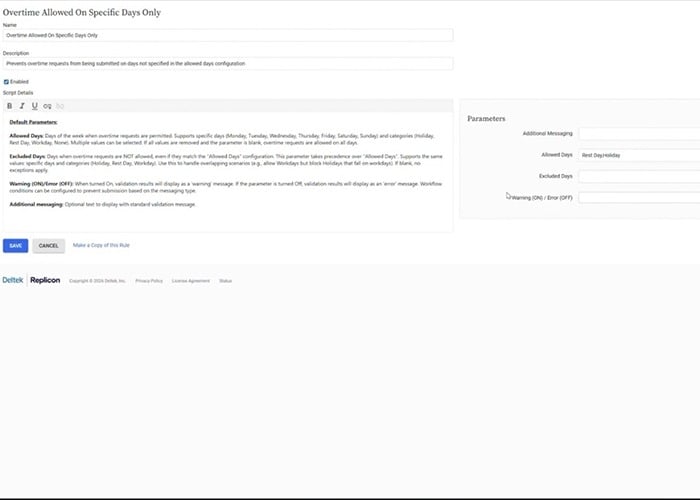
Our new overtime request validation rule allows organizations to restrict overtime submissions to specific days only, such as weekends, rest days, holidays, or explicitly defined weekdays.
Each day in a multiday request is evaluated independently, meaning some days can pass validation while others fail. The rule supports warning or error behavior and helps enforce overtime policies before requests reach approval workflows.
Apply Approval Rules Consistently, Regardless of License Type
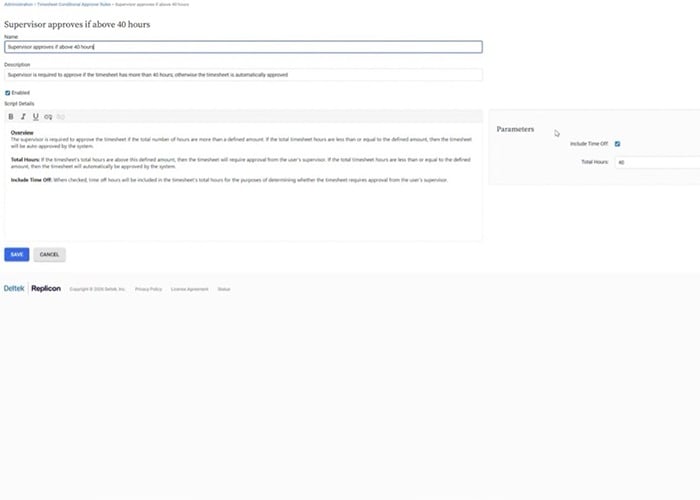
We have expanded the ‘Supervisor approves if above 40 hours’ conditional approval rule to work beyond payrolldependent licenses. Instead of relying on payroll data, the rule now evaluates approval thresholds based directly on timesheet hours logged.
This closes a longstanding gap for customers using TimeBill, enabling consistent enforcement of approval thresholds without additional configuration or workarounds.
Stay Current with Global Holidays
We have updated our outofthebox holiday calendars to include 2025 and 2026 holidays across multiple countries. For existing users:
- Updates apply only if the default calendar name was retained
- Customeradded holidays are not overwritten
- Missing holidays are added automatically
- Submitted and approved timesheets are not reopened
This is the first time holiday updates have been applied to existing users in this controlled, nondisruptive way.
Stay Connected
These enhancements reinforce our commitment to improving accuracy, configurability, and the everyday experience of both users and administrators. Whether it’s simpler validation, improved reporting, or new ways to view schedules, each update brings your teams closer to a smarter, more efficient timetracking workflow. To learn more about these new features, register for the Q1 Replicon Customer Town Hall and stay up to date!