Construction businesses need efficient, user-friendly, and adaptable software to manage today’s challenges. With each release, Deltek ComputerEase aims to enhance the user experience and address the ever-changing needs of the construction industry.
ComputerEase's upcoming version 23.3 is a game-changer for construction professionals. Packed with advanced features and improvements, this release will revolutionize how you manage your jobs, streamline your operations, and boost your overall productivity.
Discover How the Latest Features and Updates Enhance Your Workflow
In the latest release of Deltek ComputerEase, we’ve unlocked various features tailored to your evolving needs. At Deltek, we're dedicated to purposeful innovation. With your valuable input guiding us, we've invested in refining our software to ensure you reap the maximum benefits from every update.
Streamlined Entry Screens: User-Friendly Entry Screens
This latest release introduces visual changes to entry screens, offering the choice between light and dark modes. These changes cater to your preferences while ensuring a consistent and efficient workflow, maximizing your visual appeal.
Dark Mode: Elevate Your Productivity and Comfort
ComputerEase 23.3 prioritizes your comfort, productivity and overall user experience with dark mode. Dark mode isn't just a trendy feature; it enhances your user experience. It's designed to minimize eye strain during extended work hours, a vital benefit for those with long workdays. Additionally, it conserves battery life, which is especially beneficial for devices with organic light-emitting diodes (OLED).
Dark mode gives your workspace a modern, high-contrast appearance that makes content more readable and elevates the software's visual appeal. You'll experience a stylish and contemporary look that aligns with our commitment to staying ahead of design trends.
Dark mode shines in low-light conditions minus such as dimly lit offices or nighttime work sessions. It reduces glare and ensures comfortability while prioritizing your well-being and adding to your overall comfort and efficiency.
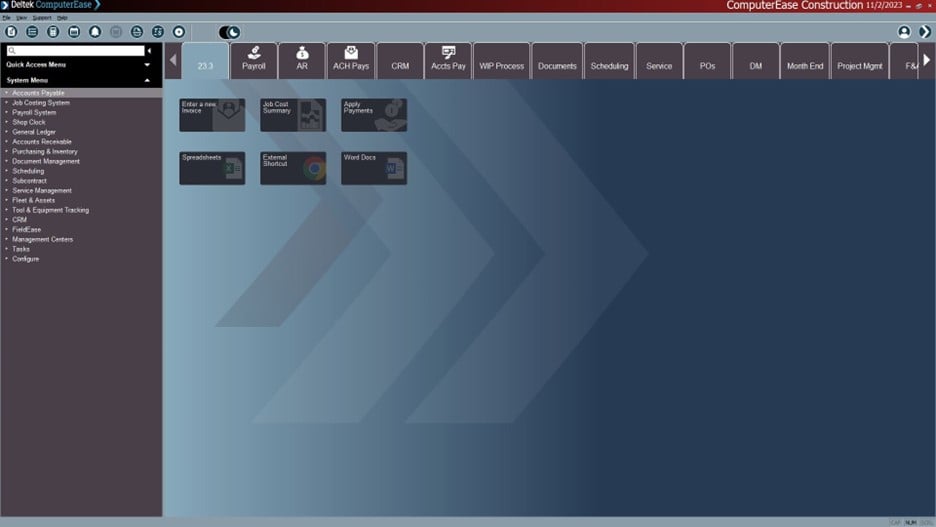
Deltek ComputerEase Dark Mode example
Improved Color Schemes: Enhancing User Personalization
In version 23.3, we are excited to introduce significant enhancements to our company-based color schemes. While ComputerEase has offered company-based color schemes in the past, this update focuses on improving functionality and the user experience.
For example, when you are part of "Company ABC," you'll enjoy a green color scheme across various software elements of the company in which you are working. This configuration option makes it quick and easy to identify your company affiliation, streamlining your workflow for maximum efficiency.
Company-based color schemes are just one example of Deltek’s dedication to continually improving and adapting our features to serve your needs better.
Easy Access to External Resources
In this release, we are also introducing a feature that allows users to include external URLs in your workflow menus. This powerful capability reminds you and enables you to connect directly with external resources, such as websites, spreadsheets, or Word documents, from your software interface. This functionality ensures convenience and a significant boost in workflow efficiency.
Enhanced QTool: Efficiency and User-Friendly Updates
QTool, a core reporting and inquiry feature within ComputerEase, has undergone significant updates to enhance your user experience. These updates include a new query view, removing menu images for a streamlined appearance, and shifting from "filters" to "reports" for improved user-friendliness.
Revamped Centers: Visual and Functional Improvements
Our Deltek ComputerEase Centers are all receiving enhancements to their visual elements and functionality.
These changes include updates in graphing and colors, providing you with a fresh and modern look. You can now move between different centers while maintaining drill-down functionality, ensuring a smooth and efficient workflow.
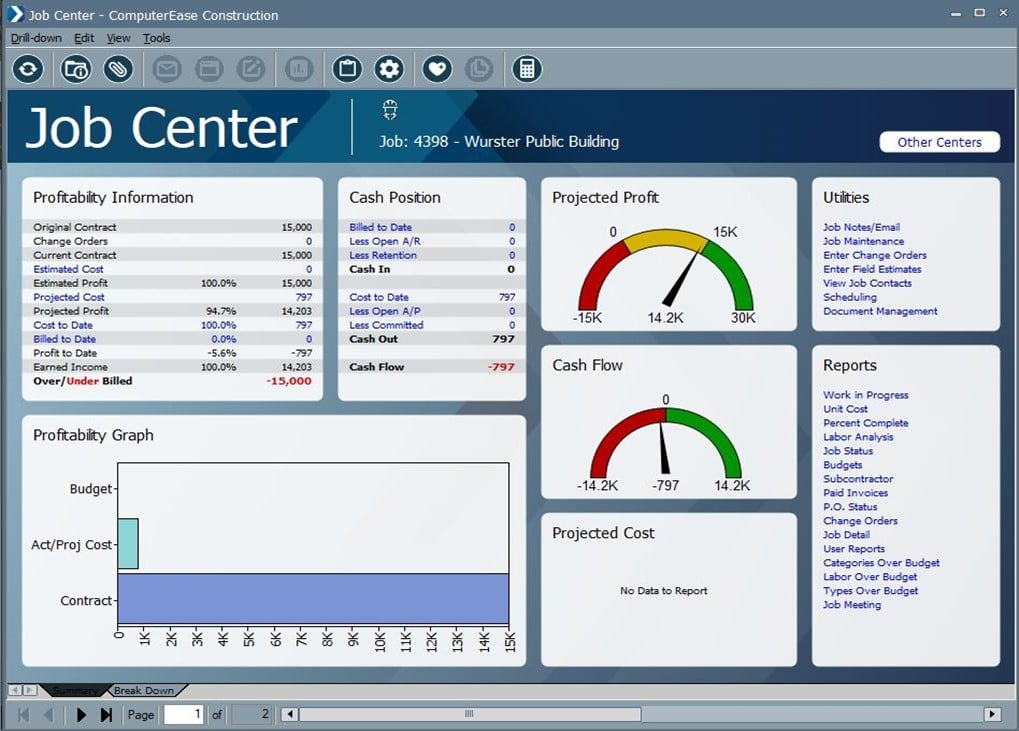
Deltek ComputerEase Job Center in Dark Mode
Personalized In-App Messages: Customized Communication
In version 23.3, you gain control over the types of Deltek ComputerEase in-app messages your users receive. This allows you to customize your message preferences based on your individual or group needs, ensuring your communication experience within the software is tailored for maximum benefit.
Color-Coded and Prioritized Messages: Efficient Communication
To make in-app messages even more user-friendly, we've color-coded and prioritized them based on their importance and content. Each message type is associated with a specific color, making it quick and easy to identify. Additionally, we've added an "X" button for you to dismiss or acknowledge each message. These updates are designed to enhance your communication efficiency and ensure that you never miss important information.
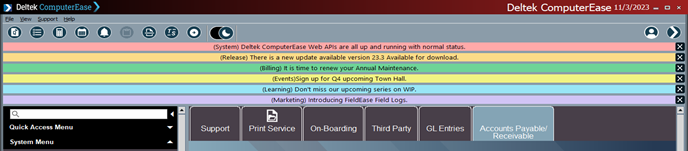
Deltek ComputerEase Color-Coded In-App Messages
Unlock the Full Potential of Your Workflow with ComputerEase Version 23.3
With ComputerEase's 23.3 update, you're not just getting an ordinary software upgrade—you're gaining a powerful tool to maximize your workflow efficiency, boost your productivity, and ensure your daily working comfort. Every aspect of this update is geared towards delivering the maximum benefits to you.
Demo
See Deltek ComputerEase in Action
Increase profitability and outpace competition with job cost accounting software that puts you in control, purpose-built for construction.